Scan to Download
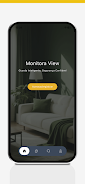
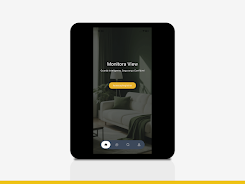
Monitora View is a video monitoring application designed to give users straightforward access to live camera feeds and recorded footage from IP cameras and DVR/NVR hardware. Monitora View combines real-time viewing, playback, and image capture with event notifications so you can monitor property, review incidents, or collect evidence from a mobile device. The app focuses on reliable P2P and direct network connections to supported devices, offering a compact interface that helps both novices and experienced users check streams, respond to alerts, and export short clips when needed.
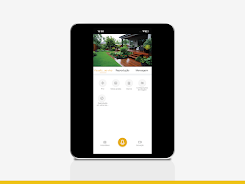
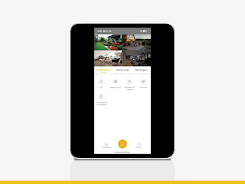
The core capabilities include live view of IP cameras and DVRs using P2P or direct connection methods, access to playback of recordings stored on connected DVR/NVR units, and the ability to capture still images or record short video clips from live streams. Event notifications inform you of motion or system events so you can jump to the relevant feed immediately. Monitora View is compatible with DVR-V series DVRs, NVR-V series NVRs, and IPC-V series cameras, and is optimized for paired devices to reduce setup friction and improve stability when viewing multiple channels.
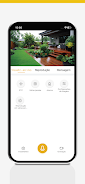
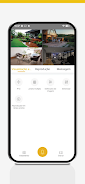
The app exposes familiar controls for navigating live and recorded video: pinch-to-zoom on live streams, tap-to-fullscreen for selected channels, and intuitive playback scrubbers when reviewing archived footage. Monitora View supports multi-channel layouts to view several cameras at once and simple tap gestures to switch channels or focus on a single feed. Playback controls include variable speed scrubbing and quick-skip to recent events, making it easier to locate important moments without long manual searching. The UI emphasizes clear thumbnails, concise status indicators for each device, and contextual prompts during initial setup to guide less technical users.
Recorded footage can be accessed directly from the connected DVR/NVR device; the playback interface presents a timeline and event markers when the source provides them, allowing rapid review of motion-triggered segments. You can capture still images from live or recorded frames and save short video clips to local storage for sharing or archival purposes. Exported files follow common video and image formats so they can be viewed on other devices or attached to incident reports. These on-device capture options are intended for quick evidence collection without relying on cloud services.
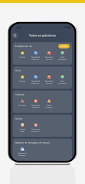
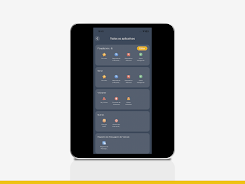
Monitora View supports both P2P connections for simplified pairing and direct network connections for users who prefer to configure devices on their own network. The app is specifically designed for DVR-V, NVR-V, and IPC-V hardware families; pairing is typically done by scanning a device QR code or entering the device ID and credentials. Direct connection setups may require basic router or port configuration on some networks, and the app provides status messages and simple troubleshooting hints when a device cannot be reached. For users managing many cameras, device grouping and naming help keep feeds organized by location or function.
Display and recording preferences can be adjusted so you control stream quality, recording resolution, and how long captures are kept on your mobile device. The interface supports larger text sizes and clear contrast options to aid visibility; touchscreen controls are responsive and accessible for one-handed use. When the app cannot reach live feeds, locally cached thumbnails and previously downloaded clips remain available for offline review, allowing limited access to recently saved evidence without continuous network connectivity.
While Monitora View is not a game, it offers replay-like value through repeated review of stored footage and regular event notifications that encourage frequent checks of camera coverage. Reliability is emphasized by supporting both P2P and direct modes so you can switch connection types if network conditions change. Network latency, device firmware differences, and event configuration on cameras are the most common challenges; the app includes diagnostic messages and guided steps to help resolve connectivity or configuration issues.
Monitora View works only with supported DVR-V, NVR-V and IPC-V series hardware, so compatibility with other brands is limited. Some advanced device features may not be available through the mobile interface and certain direct connections can require network knowledge or router adjustments. Event notifications depend on camera or DVR event support and proper configuration on the device itself. For users who need assistance, in-app help text and basic troubleshooting guidance are included to simplify pairing and common setup tasks.
File size: 276.10 M Latest Version: 1.1.2
Requirements: Android Language: English
Votes: 467 Package ID: com.MonitoraView.mobile.phone
Developer: JFL ALARMES
Best Free Media Apps for Your Android Phone
Explore an immersive world of entertainment with our media software. Watch, listen, and engage with your favorite shows, music, movies, and more. Access exclusive content, personalized recommendations, and innovative formats. Enhance your experience with our suite of cutting-edge applications. Discover hidden gems tailored to your unique tastes. Create, share, and connect over personalized playlists, reviews, and forums.





LIVE A HERO
Retro Hero Mr Kim
Empire of Passion
Arcane Quest Legends
Magic Snap: Momotaro
AllStar Manga Heroes
Lunescape
ONE PIECE Thousand Storm JP
Tap Titans 2