Scan to Download
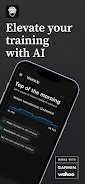
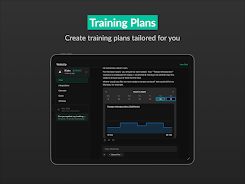
WattsUp is an AI-driven cycling coach that analyzes your rides and delivers personalized training and recovery guidance tailored to your goals. WattsUp ingests data such as power, heart rate, cadence and subjective fatigue to create clear ride reviews, adaptive workouts and a multi-week training plan that flexes when life gets in the way. The app is designed for cyclists who want structure without spending hours on spreadsheets, offering progressive recommendations whether you ride indoors, outdoors or a mix of both.
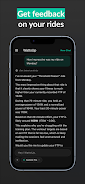
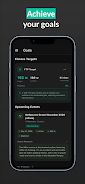
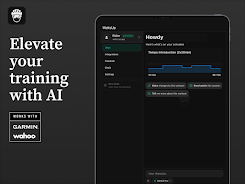
WattsUp breaks complex training data into plain-language summaries so you can understand what happened and what to do next after every ride. The coach generates dynamic workouts that scale to FTP, current fatigue and the time you have available, and it will update those sessions as your fitness and schedule change. Built-in coach chat provides answers to training questions, recovery strategies, race-day preparation and gear guidance, while goal-setting tools let you create paths for events, time targets or fitness metrics like FTP. Automatic syncing with popular cycling devices and platforms ensures both indoor trainer files and outdoor rides are captured, and the app retains your history so recommendations are informed by context, not just single rides.
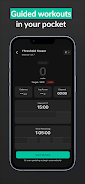
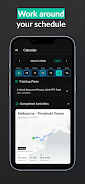
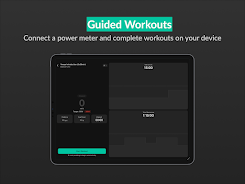
The core mechanics center on interval-based workouts, progressive overload and recovery tracking. Workouts are composed of structured intervals with explicit targets for power, cadence and perceived exertion, and each session shows segmented guidance and a clear warm-up, main set and cooldown. Controls are touch-first: you can tap to start, pause or edit an active workout, adjust target durations on the fly or swap an entire session for an alternate when your schedule changes. Pairing sensors is handled from a single device screen; the app supports common ANT+ and Bluetooth sensors and accepts standard ride files so you can import sessions exported from other tools if needed.
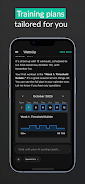
Progression in the app is organized into training blocks that build volume and intensity with planned recovery weeks to avoid overtraining. Each block has a clear purpose—base endurance, intensity development or race taper—and the AI coach shifts emphasis block-by-block rather than just week-by-week. When you miss sessions or report extra fatigue, the plan recalibrates to keep you on target for key events while preserving long-term consistency. The result is an approachable structure for riders who want measurable gains without manual periodization calculations.
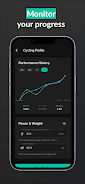
The interface uses clean, data-forward visuals: color-coded power and heart rate zones, ride maps and time-series graphs that highlight key intervals and trends. You can customize the display to emphasize the metrics that matter to you, change pace and power units, and reorder dashboard cards to surface current goals or upcoming workouts. Workout templates are editable so coaches and experienced users can tweak interval lengths, recovery times and session names, while beginners can follow guided sessions that explain why each interval matters.
The app encourages replay value by offering repeatable structured workouts with progressive targets, weekly challenges tied to consistency and performance benchmarks, and personal best tracking for favorite routes or efforts. Because workouts adapt as you improve, sessions remain challenging and relevant rather than becoming routine. You can retest FTP or select targeted intervals to assess progress without changing your overall plan, which keeps training focused and measurable over months.
WattsUp is built with accessibility in mind: readable typography, adjustable contrast and clear labeling for charts and controls help riders of varying needs navigate the app. Offline ride capture and cached workouts allow you to complete sessions without an immediate network connection and sync later when connectivity returns. Sync settings and privacy controls let you choose which platforms or devices to connect so you keep ownership of your training data while taking advantage of automatic imports and backups.
For best results, WattsUp performs optimally when paired with power and heart-rate sensors, so riders without those devices may see more conservative recommendations. The AI coach becomes more tailored after several recorded rides, so a short familiarization period is expected. Battery consumption when recording GPS or maintaining sensor connections varies by device and sensor type, so following device-specific guidance will maximize session reliability. Overall, WattsUp aims to reduce planning overhead and keep the focus on consistent, guided progress rather than manual schedule management.
File size: 31.64 M Latest Version: 1.0.7
Requirements: Android Language: English
Votes: 229 Package ID: com.jezhou.wattsup
Developer: 021 Studios

Top Free Fitness Necessary Apps for Android
Reach your fitness goals and maximize workouts with our revolutionary exercise apps. Track progress, log workouts, and analyze performance using our intuitive tracking tools. Follow customized training plans tailored to your level and interests. Learn new exercises and techniques with our video instructional library. Monitor heart rate, calories burned, and other metrics to optimize your routine.






LIVE A HERO
Retro Hero Mr Kim
Empire of Passion
Arcane Quest Legends
Magic Snap: Momotaro
AllStar Manga Heroes
Lunescape
ONE PIECE Thousand Storm JP
Tap Titans 2