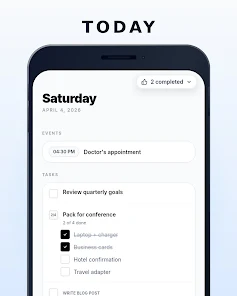
WhenSpace brings your tasks, calendar events and daily habits together into a single, calm Today view so you can open your phone and immediately see what matters this morning. WhenSpace replaces the habit of flipping between multiple apps by presenting timed events, check-off tasks and habit trackers in one prioritized feed where overdue items rise to the top and less urgent ideas live in a Someday place until you are ready to schedule them. The first paragraph of this description outlines the app’s intent: to reduce switching and decision friction while keeping each morning’s priorities visible and actionable.
The Today view is the central interaction: timed events appear inline with three task types and habit entries so you can act without changing screens. Quick check-offs let you tap to complete errands, checklist tasks group related items into a single expandable card, and step-by-step tasks reveal only the current step to keep attention on the immediate next action. Timed events show start times and durations alongside tasks so scheduling context stays clear, and overdue items automatically surface to signal what needs attention first. This interaction model treats your day like a concise, actionable feed rather than a set of disconnected lists.
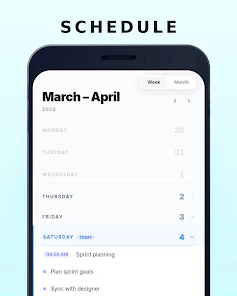
Controls are intentionally simple and gesture-friendly: tap to complete or open an item, press and hold to edit details, swipe to archive or reschedule, and drag to reorder within the Today feed. When creating a new item you choose the task type that fits your workflow and can attach counts, durations or recurrence rules to habit entries. Compact planning options let you scan a sparse month view that only shows days with items, and a seven-day glance supports short-term planning without clutter. These controls are consistent across the app, so common actions remain fast and predictable.
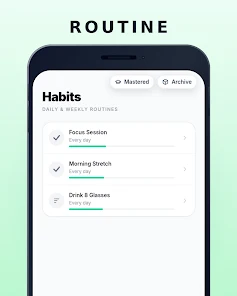
Progression is built around steady improvement rather than one-off completion. Habit tracking uses a streak-oriented visual meter that highlights progress toward practical thresholds and encourages routine formation by making streaks visible. Multi-step tasks form a lightweight progression system: each step becomes the immediate focus until completed, then the next step appears. You can set numeric counts, duration goals or simple check-in rules for habits, and the app surfaces which habits are trending up or slipping so you can adjust without digging into settings.
The visual approach is intentionally sparse and calm: minimal typography, muted color accents and restrained card layouts keep attention on content rather than decoration. The app’s structure is organized into short-term (Today), mid-term (7-day glance) and long-term (sparse month plus Someday) layers so you can move items between horizons without losing context. This layered setup acts like levels of planning: immediate tasks sit on the surface, scheduled events and weekly plans live a layer down, and conceptual or future ideas are tucked into Someday until promoted.
WhenSpace offers small but meaningful personalization options so the interface adapts to your habits. You can toggle compact spacing, choose whether the month hides empty days, decide how Someday items surface during review sessions, and adjust how much context multi-step tasks display. These controls let you shape the daily dashboard to be denser or more spare depending on your preference, and they preserve a consistent Today-first rhythm across weeks.
Replay value comes from habit maintenance and the clarity of a daily dashboard rather than novelty features. Because the app minimizes friction for common interactions, daily reopening often becomes a healthy habit in itself. The design favors repeated use: check-off speed, visible streaks, and a prioritized feed keep momentum, while periodic review actions and Someday promotions provide gentle prompts to re-evaluate longer-term ideas without overwhelming the morning routine.
Accessibility considerations are built into the interface with clear contrast, readable font sizes and straightforward navigation to help users with varying needs. WhenSpace is designed to keep items available offline so your planning and habit tracking stay uninterrupted when you are without network access; entries and progress are accessible and changes sync when a connection returns. Predictable behaviors for tapping, holding and reordering lower the learning curve for new users while remaining efficient for power users.
The app prioritizes a focused daily dashboard and sustainable habit continuity, which means it intentionally avoids replicating deep project-management suites. If you need complex task hierarchies or Gantt-style planning, those capabilities are not the emphasis here. The sparse month view can feel terse if you prefer a densely populated calendar, and the Someday bucket intentionally hides undated ideas until you review them. For people who want a calm, single place to combine tasks, timed events and habits and maintain steady progress day to day, WhenSpace offers a purposeful, low-friction environment that keeps what matters visible without overwhelming your morning routine.
File size: 22.00 M Latest Version: 1.1.8
Requirements: Android Language: English
Votes: 382 Package ID: app.whenspace.main
Developer: Marcin Syngajewski

Top Health Free Apps for Android
Take charge of your wellbeing with our innovative health and fitness apps. Monitor your activity, sleep, nutrition and more using our advanced tracking tools. Access personalized insights to develop healthy habits. Check symptoms, manage medications, and connect with doctors through our telehealth services. Follow customized workout plans for any fitness level with our virtual coaching.






LIVE A HERO
Retro Hero Mr Kim
Empire of Passion
Arcane Quest Legends
Magic Snap: Momotaro
AllStar Manga Heroes
Lunescape
ONE PIECE Thousand Storm JP
Tap Titans 2