
Scan to Download
Quintal do Beach brings your gym workflow to your phone, letting members of EVO-enabled clubs manage workouts, class bookings and messages from anywhere. The app centralizes access to planned workouts and class schedules, offers simple check-in and reservation controls, and sends timely alerts when spots open or when an activity is about to start. Designed for members who want to reduce front-desk visits and keep a consistent routine, Quintal do Beach focuses on scheduling and notifications so you can concentrate on training rather than logistics.
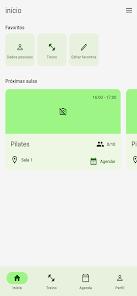
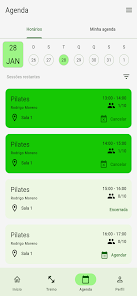
The app provides direct access to your scheduled workouts and class calendar so you can review what’s planned for the day or week. Class pages show times, instructor details (when provided by your club) and capacity status, and the check-in control lets you confirm attendance quickly upon arrival. Reservation tools allow you to book a spot in advance and join waitlists; when a place becomes available, push notifications or in-app alerts notify you so you can secure that opening without continuously refreshing the schedule. Messaging is integrated so you can receive confirmations and club announcements in one place.
Quintal do Beach uses familiar mobile controls: tap-to-book, swipe to browse schedules, and simple dialogs for confirming check-ins and cancelations. The interface is designed to minimize steps between finding a class and completing a reservation, with clear labels for times and availability. Notification settings can be adjusted to control reminder timing and alert types, and basic account settings let you update contact preferences. These controls are purposefully lightweight so members of varying technical comfort can navigate bookings and updates efficiently.
Rather than offering gamified point systems, Quintal do Beach supports steady progression by keeping your planned sessions and recurring classes easy to follow. By centralizing workout plans and class reservations, the app helps you maintain consistent attendance and return to routines week after week. Replaying a training schedule or reserving the same class series is straightforward, which increases long-term value for members who prefer structured training blocks or seasonal programs offered by their club.
The app adopts a component-based visual style that emphasizes readable schedules and clean action buttons; class cards are organized by date and time to make scanning fast. Level structure in this context refers to how classes are grouped—beginner, intermediate and advanced sessions depend on how your club labels them—so the app mirrors the club’s structure rather than imposing its own tiers. This approach makes it easy to filter and choose classes appropriate to your current skill or energy level.
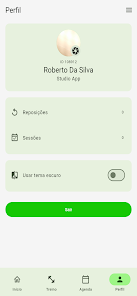
Quintal do Beach supports basic personalization so members can tailor notifications, favorite recurring classes, and set preferred locations if the club operates multiple rooms or sites. Personal settings help the app present the most relevant sessions first and reduce friction when booking. Where clubs provide coach or program notes, those are displayed alongside scheduled workouts so you can prepare equipment or adjust intensity in advance.
The design aims for legibility and straightforward navigation, which benefits users with visual or motor accessibility concerns. Standard platform accessibility features such as scalable text and screen-reader compatibility depend on your device, and the app honours those system settings where supported. Because reservation and notification features rely on network connectivity and permissions (notifications, calendar integration when offered), the app prompts for necessary access in context and explains why each permission helps the experience.
Quintal do Beach shows recently loaded schedules and workout details when connectivity is intermittent, allowing you to view plans that were previously fetched; however, booking, check-in and real-time availability updates require an active connection to your club’s EVO backend. The app caches minimal data to improve speed and reduces background activity to conserve battery when not in active use. All sensitive messages and reservations are delivered through your club’s secure channels as implemented by the EVO system.
The app is intended for members of clubs that use the EVO system, so functionality is dependent on club participation and accurate schedule data provided by the club. Reservations, notifications and check-in only work reliably when the gym maintains current availability information and your device has necessary network access and permissions. If your club does not use EVO-enabled services, Quintal do Beach may have limited usefulness outside participating locations.
File size: 51.00 M Latest Version: 2.0.800
Requirements: Android Language: English
Votes: 271 Package ID: br.com.w12.quintaldobeach
Developer: W12 EVO

Best Free Books Apps for Your Android Phone
Discover your next great read with our innovative book apps. Access millions of ebooks, audiobooks, and comics on any device. Get personalized recommendations from our advanced algorithms so you always have your next great story lined up. Track your reading habits and browse curated lists for inspiration. Join online book clubs to connect with fellow bibliophiles. Listen to samples and download seamlessly with our integrated stores.






LIVE A HERO
Retro Hero Mr Kim
Empire of Passion
Arcane Quest Legends
Magic Snap: Momotaro
AllStar Manga Heroes
Lunescape
ONE PIECE Thousand Storm JP
Tap Titans 2