Dividido is a colorful, easy-to-use bill splitting app that removes awkward end-of-meal math and helps groups settle shared expenses in seconds. Designed for quick, single-bill situations, Dividido calculates each person’s share, applies a tip, and offers optional rounding so payments can be completed with minimal fuss. The interface is bright and approachable, and sharing options let everyone in the group receive the same clear breakdown through your device’s messaging or email apps.
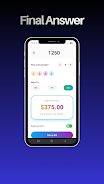
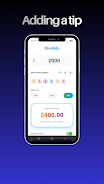
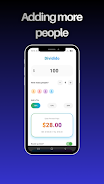
The core workflow in Dividido is intentionally simple: enter the total bill amount, pick the number of people sharing, choose or type a tip percentage, and review the per-person total. A visible breakdown shows the base bill, total tip, and final amount per person so there is no guesswork. Common tip presets are provided for convenience while a custom input accepts any percentage you prefer. A rounding toggle makes it easy to round up small cents for cash exchanges or quick peer-to-peer transfers.
Controls follow familiar mobile conventions to keep the learning curve low. Numeric entry uses the device keyboard, and an accessible plus/minus control adjusts the split size. Tip choices are presented as a row of buttons with an editable field for custom values. The rounding option is a simple on/off switch and the share button composes a compact text summary that can be sent through your installed messaging apps. Because these controls are straightforward and clearly labeled, Dividido works well for users who need a fast answer in social situations.
Visually, Dividido aims for clarity and a friendly mood rather than flashy animation. A cheerful palette highlights important numbers and controls while larger fonts emphasize the total and per-person amounts. This approach supports quick scanning at the table: you can enter values, confirm the split, and share the results in a handful of taps. The app keeps the focus on readability so groups can resolve payments without returning to the bill or debating math.
Dividido is built to function without a network connection for its core calculations, so you can split a bill on the subway, in a remote café, or wherever you don’t have reliable data. Sharing uses your device’s native messaging or email client, so that portion may require connectivity depending on your sending method. The app design favors large touch targets and high-contrast elements to improve usability for a broad range of users, and it is compatible with standard platform accessibility features like screen readers and adjustable font sizes.
Although Dividido is not a tracking or budgeting tool, it offers replay value through speed and convenience: for people who split bills frequently—students, roommates, and travel companions—the app becomes a reliable habit for every shared meal. The quick, repeatable steps reduce cognitive load at the table and make each new split nearly as fast as the last. Because it focuses on single-event resolution, learning the app is essentially instantaneous and rewards continued use with consistent, predictable results.
Dividido eliminates awkward end-of-meal arithmetic and saves time by performing tip calculations and per-person division automatically. The transparent breakdown of amounts reduces disputes by making every component of the total visible, and the compact share feature ensures everyone sees the same numbers. Lightweight and focused, the app is well suited to casual gatherings and on-the-go splitting where long setup or account creation would be inconvenient.
By design, Dividido focuses on single-bill splits and does not provide long-term expense tracking, group ledgers, or detailed IOU management across multiple events. It also does not process payments directly: users must still complete transfers or cash settlements using their preferred payment apps or methods. If you need multi-event budgeting or integrated payment handling, a dedicated expense-tracking or payment app would be a better fit.
File size: 28.68 M Latest Version: 0.0.4
Requirements: Android Language: English
Votes: 97 Package ID: com.qari.dividido
Developer: Qari Mudassir


Best Free Travel Apps for Your Android Phone
Make travel planning effortless with our all-in-one trip companion app! Get insider tips from locals on top attractions, hidden gems, restaurants, and accommodations at your destination. Book flights, rental cars, and hotels at the lowest prices. Access maps offline; track bookings, itineraries, and reservations; create shared group trips; and auto-translate menus, signs, and conversations abroad. Our clever algorithms surface personalized recommendations everywhere you go.






LIVE A HERO
Retro Hero Mr Kim
Empire of Passion
Arcane Quest Legends
Magic Snap: Momotaro
AllStar Manga Heroes
Lunescape
ONE PIECE Thousand Storm JP
Tap Titans 2