
Scan to Download
Pingo helps you turn saved social posts into real places you can visit by finding exact locations from captions, reels, and images. Pingo appears in your share sheet and app list so you can import a café, shop, or scenic spot with a single tap, then keep everything organized on a searchable map instead of losing ideas in a long list of saved posts.
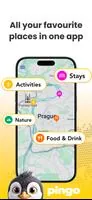
One-tap import: bring locations from saved social posts into the app without manual searching, using a simple import flow that preserves the original post preview and caption. Smart extraction: the app detects place names and visible landmarks in videos and images and suggests likely matches so you can confirm or refine results. Map-first view: all saved spots are shown on a zoomable, pan-able map with thumbnails pulled from the source post to make it easy to recognize each place at a glance. Custom organization: add notes, tags, and categories to every pin, and rename or retag places after import so feeds of inspiration become structured collections. Fast search and filters: search by name, tag, category, city or proximity and filter results for trip planning, weekend ideas, or food spots. Persistent lists and checklists: save lists for future visits, mark spots as visited, and keep them in a compact, searchable archive.
Importing is designed to be intuitive: use Pingo from your social app’s share or save menu to start an import, then review the suggested location on a map preview. Tap a pin to open details, add or edit notes, and use simple controls to change categories or mark a place as visited. Manual refinement tools let you adjust a pin or set a more precise marker when a match is close but not exact, and inline previews show the original image or clip so you always know which post produced the entry. Map navigation works with standard gestures—pinch to zoom, swipe to pan, and tap to open details—so no new learning curve is required.
Pingo supports a practical progression from scattered inspiration to a curated personal guide. As you add places you build collections that can be organized by trip, neighborhood, cuisine, or any custom category you create. The app’s checklist and visited flags let you track progress through a list of goals—try new cafés, revisit favorite parks, or complete a photo walk itinerary. Because collections are searchable and filterable, a small set of saved places can quickly become a repeatable route or a multi-day plan, which gives the app long-term usefulness beyond a single discovery session.
Pingo uses a clean, map-focused interface that emphasizes imagery from the original post and clear category coloring rather than heavy branding. Thumbnails and short excerpts from the source post appear on each place card so you can visually match entries. You can choose custom category colors and add brief icons or emojis to your categories to personalize how lists look. The layout balances compact map browsing with an expandable place details pane for notes, directions, and quick actions like opening the location in your preferred navigation app.
Designed for practical everyday use, Pingo aims to be accessible with large tap targets, readable typography, and support for system text sizing and screen readers. For travel or areas with spotty service, the app can cache recently viewed maps and saved places so basic browsing and notes remain available offline. Search and filter operations are optimized for responsiveness, and import confirmations reduce the need to replay videos or re-open posts, saving time and battery when you’re on the go.
No tool is perfect: Pingo’s ability to locate a place depends on the cues present in the original post. If a reel or photo contains no identifiable text, signage, or landmark, the app may not find a precise match and will ask you to refine the location manually. Accuracy can vary when the source post lacks geographic hints, and private or removed posts cannot be imported after they’re deleted or restricted. These constraints are handled transparently in the interface so you can make quick adjustments when needed.
Pingo turns passive inspiration into actionable spots on a map, saving time you would otherwise spend rewatching stories or guessing where a place is located. Whether you’re collecting neighborhood recommendations, planning a trip, or simply keeping a personal list of places to try, Pingo helps you maintain a tidy, searchable archive of real-world locations tied directly to the posts that inspired them.
File size: 47.00 M Latest Version: 1.0.2
Requirements: Android Language: English
Votes: 140 Package ID: app.mistrin.mymap
Developer: Tomas Mistrik




Best Free Travel Apps for Your Android Phone
Make travel planning effortless with our all-in-one trip companion app! Get insider tips from locals on top attractions, hidden gems, restaurants, and accommodations at your destination. Book flights, rental cars, and hotels at the lowest prices. Access maps offline; track bookings, itineraries, and reservations; create shared group trips; and auto-translate menus, signs, and conversations abroad. Our clever algorithms surface personalized recommendations everywhere you go.






LIVE A HERO
Retro Hero Mr Kim
Empire of Passion
Arcane Quest Legends
Magic Snap: Momotaro
AllStar Manga Heroes
Lunescape
ONE PIECE Thousand Storm JP
Tap Titans 2