
Scan to Download
DidI is a practical lifelogging app that remembers your day so you don't have to, automatically converting movement, location and app usage into a clean, visual timeline you can review at a glance. Designed for people who finish the day asking "Where did I go today?" or who want a low-effort diary, DidI infers likely activities, highlights recurring habits and creates nightly summaries so reflection becomes simple rather than time-consuming. This introduction explains how the app works, what to expect from the timeline and how privacy and customization keep your data under your control.
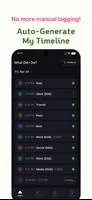
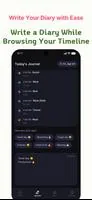
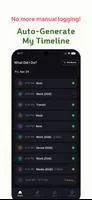
DidI runs in the background to build a readable, day-by-day story from passive signals: walking and driving patterns, stays at locations, and which apps you used and when. The app turns those signals into labeled events such as study sessions, commuting, or time at a cafe, presenting them on a horizontal timeline with time markers and location thumbnails. Each night DidI generates a short, personalized insight that can act as encouragement or an objective summary of your day, calling out productivity blocks, long commutes, or unusual activity spikes. You can quickly attach a short feeling, note or tag to any inferred event so your diary becomes richer without much typing.
The timeline is built for quick navigation: drag or scrub along the day, tap an event to expand details, and long-press to edit the label, add text or correct the location. A compact map view shows where clusters of events occurred, and an event editor allows simple corrections that improve future inferences. Settings let you tune sensitivity for location clustering and the types of inferred labels the app presents. DidI is intended to be lightweight in daily use: most interaction is optional, limited to occasional edits or brief reflections that reinforce memory cues.
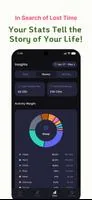
Rather than game-like levels, DidI focuses on useful progression: weekly and monthly trend views make it easy to spot repeating routines, productivity windows and time sinks. Habit recognition surfaces activities that occur frequently and groups them visually, so you can see how consistent you are with studying, exercise or breaks. Nightly insights summarize trends and can highlight improvements or regressions over time. Optional gentle reminders and reflection prompts encourage consistency without turning journaling into another chore.
The app emphasizes clarity: the timeline uses color coding for broad activity categories, simple icons for quick recognition and zooming to move between day, week and month levels. Each event includes a concise label, duration and context such as nearby place names when available. High-contrast themes and an available dark theme reduce eye strain, while compact and expanded views accommodate both quick skims and deeper review sessions. Visual cues are designed to help memory recall rather than to overwhelm with raw sensor data.
DidI offers customizable privacy and backup options: by default processing happens locally on your device so sensitive location and activity data is not transmitted. If you opt into cloud backup, records are encrypted to protect them in transit and at rest. The app supports exporting individual entries or ranges for personal archiving. Because most analysis is local-first, core features are available offline; backup and cross-device sync are optional and require explicit consent and configuration.
Accessibility has been considered through adjustable font sizes, clear touch targets for timeline controls and compatibility with screen readers. The interface prioritizes simple gestures and minimal text entry so people with limited dexterity or those who prefer voice-assisted navigation can still use the app comfortably. Notifications and summary times are configurable to avoid disrupting focused work or sleep.
Automatic inference is powerful but imperfect: DidI can occasionally mislabel activities or miss subtle social context that only you would recall. Background tracking needs the relevant permissions and can affect battery usage on some devices; the app provides settings to reduce sampling frequency when battery is low. Cloud backup is optional and requires an explicit opt-in, so if you prefer strictly local-only storage you will keep your records on-device unless you choose otherwise. These boundaries are communicated clearly in settings so users can match functionality to their privacy and power preferences.
By combining automated capture with quick, context-based editing, DidI aims to lower the barrier to consistent reflection and personal record-keeping. The app helps you recover forgotten moments, understand daily patterns and maintain a searchable timeline of your life without forcing manual entry every day. For anyone wanting a practical, privacy-conscious lifelog that supports reflection rather than surveillance, DidI offers a balanced, easy-to-use solution.
File size: 47.06 M Latest Version: 1.6.1
Requirements: Android Language: English
Votes: 81 Package ID: com.whatdidi.whatdidi
Developer: franholdings





Top Events Free Apps for Android
Discover and share the hottest events around with our intuitive apps. Find local concerts, festivals, shows, and more based on your unique interests. Create customizable calendars of upcoming events to coordinate schedules with friends. Purchase tickets seamlessly from our integrated platforms. Check real-time transit schedules to plan your trip. Access maps, directions, and parking information for any venue.






LIVE A HERO
Retro Hero Mr Kim
Empire of Passion
Arcane Quest Legends
Magic Snap: Momotaro
AllStar Manga Heroes
Lunescape
ONE PIECE Thousand Storm JP
Tap Titans 2