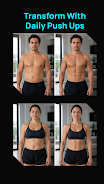
My Push-ups is a focused training app that helps you turn a weak or inconsistent push-up habit into steady progress toward a clear target. My Push-ups guides you from your current maximum to a goal you set, using a day-by-day program that keeps workouts short, structured and predictable. The app is designed for people who prefer a single, reliable progression instead of complicated multi-exercise plans.
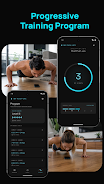
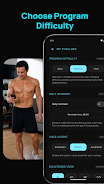
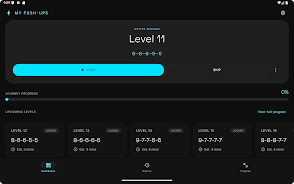
The core progression in My Push-ups is built around one training level per day. After you enter your current max and your target number of push-ups, the app calculates a series of daily sessions that include specific sets, rep counts and rest intervals. You pick one of three training styles — Easy, Balanced or Hard — and the schedule adapts to that choice so your weekly workload matches your recovery and time availability. Each level is intended to be completed in a single short session, making it easy to maintain consistency over weeks and months.
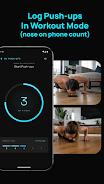
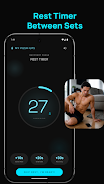
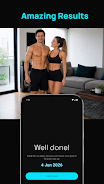
The workout screen is intentionally minimalist to reduce distractions when you train. Reps are logged with simple taps, and a built-in countdown and voice guidance help you keep pace during sets and transitions. The rest timer runs automatically between sets and supports quick on-the-fly adjustments if you need a longer or shorter break. Visual and audio cues give small celebratory feedback when you complete sets so you get immediate reinforcement without flashy animations.
Progression in My Push-ups is steady and measurable: the planner shows an estimated date for reaching your target so you can plan around it. If you miss a day or a level feels too easy, the app lets you repeat or skip levels within the structure of your chosen training style so you can fine-tune the challenge. That approach creates replay value through repeatable cycles and incremental adjustments rather than random variation, encouraging adherence to a habit instead of chasing novelty.
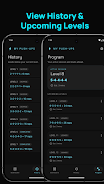
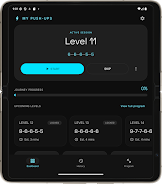
All workout history and progression data in My Push-ups is stored locally on your device, which means you can use the app fully offline and retain complete control of your data. The dashboard and program views give quick at-a-glance information about your current level, upcoming sessions and recent performance. Customization focuses on practical choices: you can change your target goal, switch training styles, and toggle a one-time in-app purchase to remove banner ads for uninterrupted sessions. There is no cloud sync or cross-device backup, so users who switch devices should export or otherwise preserve their history externally if desired.
The visual style prioritizes clarity and readability: large, high-contrast text, clear buttons and an uncluttered layout are intended to help users concentrate on reps rather than menus. Voice prompts and the tap-to-log control offer alternative interaction modes for different preferences, and the app generally aims to be accessible for users who prefer larger controls or who train in noisy environments. Animations are kept minimal so the interface feels responsive even on older phones.
My Push-ups is suited to beginners who want a simple, guided path to increasing reps and to more experienced exercisers who need a low-friction way to maintain or rebuild push-up capacity. Because the app focuses exclusively on push-ups, it pairs well with other fitness tools if you want a broader routine, but it intentionally avoids full-body programming to remain specialized and easy to follow. The straightforward interface and short session design help the app fit into busy schedules and support steady improvement through consistent practice.
There are trade-offs to the simplicity: My Push-ups does not offer cloud synchronization, advanced analytics or integrated guidance for other exercises. The single-discipline focus means users looking for a full workout suite will need additional apps. Banner ads are present by default, though a one-time purchase removes them for an ad-free experience.
File size: 53.13 M Latest Version: 1.11
Requirements: Android Language: English
Votes: 269 Package ID: com.mypushups.app
Developer: KH Sundberg

Top Free Fitness Necessary Apps for Android
Reach your fitness goals and maximize workouts with our revolutionary exercise apps. Track progress, log workouts, and analyze performance using our intuitive tracking tools. Follow customized training plans tailored to your level and interests. Learn new exercises and techniques with our video instructional library. Monitor heart rate, calories burned, and other metrics to optimize your routine.





LIVE A HERO
Retro Hero Mr Kim
Empire of Passion
Arcane Quest Legends
Magic Snap: Momotaro
AllStar Manga Heroes
Lunescape
ONE PIECE Thousand Storm JP
Tap Titans 2