Scan to Download
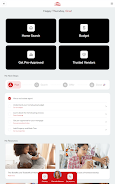
Secure Home Finder is a focused productivity app for home buyers and owners in the Coastal Carolinas that brings education, listings and local services together in a single, practical interface. Designed for both first-time buyers and experienced homeowners, Secure Home Finder combines a clear learning library, a live property search portal and a vetted vendor directory so you can move from early research through pre-approval, viewings and closing with fewer interruptions and better organization.
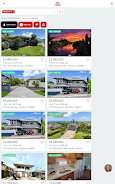
The app includes an in-app educational library with step-by-step articles and checklists that explain typical costs, timelines and the documents you will encounter during a transaction. The real-time property search portal lets you toggle between map and list views, save searches and set instant alerts for new listings and price reductions. Built-in messaging supports direct conversations with agents and loan officers and lets you attach inspection photos or notes from tours. Secure Home Finder also connects you with trusted local loan officers to clarify budget and pre-approval requirements, and it provides a curated directory of vetted contractors, inspectors and other service providers relevant to coastal properties. All interactions, alerts and documents are captured in organized records so your history is available when you compare options or prepare an offer.
The app’s progression system is organized around the common stages of buying and owning a home: research, financial readiness, touring properties, making an offer and closing. Each stage presents contextual checklists and milestones so users can see progress at a glance. For example, during research you can bookmark articles and properties; during pre-approval the app highlights contacts and documents you may need; while touring, the tasks focus on photos, inspection notes and scheduling follow-ups. This linear yet flexible progression helps users prioritize actions and reduces the chance of missing important steps.
Navigation emphasizes practical controls rather than complex menus: a persistent search bar, filter controls for beds, baths, price range and coastal-specific filters such as flood zone indicators, plus a map/list toggle for visual exploration. Saved searches are accessible from the home screen and can be paused or edited quickly. Scheduling controls are integrated with your device calendar for viewings, and messaging threads keep property-related conversations together. The app’s controls are designed to behave predictably so users can perform common tasks with a few taps.
The visual style favors clarity: readable typography, high-contrast list entries and photo-first property cards that show the most important details at a glance. You can customize alert preferences, choose which neighborhoods to prioritize and save vendor lists for preferred professionals. Photo galleries on property pages support zooming and full-screen review, and saved tour photos are tied to specific listings so it’s easy to compare similar homes visually. Small personalization choices let the app adapt to whether you are browsing casually or actively preparing an offer.
Replay value comes from the app’s ability to retain your search history, saved properties and completed checklists so you can revisit previous searches or use the same workflows for another buying or renovation cycle. Stored records include messages, inspection reminders and photos from tours, making it straightforward to review past decisions and share findings with family or advisors. Over time the app builds a personalized archive that supports accurate comparisons and faster decision-making in future property searches.
Accessibility features are built into core views with options for larger text, clear contrast and logical reading order for screen readers so users with different needs can access content efficiently. The app offers limited offline access to items you explicitly save: downloaded articles, saved listings and photos remain viewable without a connection, while live listing updates and messaging require an internet connection. This balance keeps essential reference materials available when you are on-site at a property while ensuring listing data is current when connectivity is present.
Secure Home Finder is focused on the Coastal Carolinas, so listing coverage and vendor options are region-specific and may not reflect inventory outside the service area. Some features depend on local agents and vendors opting into the platform, which can affect availability in certain towns or for niche services. If you rely on a particular provider or need coverage in a new neighborhood, the app includes feedback options so the team can understand demand and prioritize partnerships.
Overall, Secure Home Finder aims to simplify the home search and ownership workflow by consolidating education, listings, agent communication and trusted local services into one approachable tool. Whether you are preparing for your first mortgage or managing multiple properties along the coast, the app’s checklists, alerts and organized records are intended to keep each step transparent and manageable as you move toward your next home decision.
File size: 8.21 M Latest Version: 1.0.0
Requirements: Android Language: English
Votes: 172 Package ID: com.ruuster.android.securehomefinder.app
Developer: VIP Client Portal









Must Have Home Apps for Android
Make your house a home with our suite of helpful home apps. Discover clever tools to organize closets, streamline chores, and simplify cooking. Take the stress out of cleaning and maintenance with handy checklists and schedules. Enhance security and control appliances and lighting with our smart home integrations. Design, visualize, and renovate like a pro using our 3D planning software.






LIVE A HERO
Retro Hero Mr Kim
Empire of Passion
Arcane Quest Legends
Magic Snap: Momotaro
AllStar Manga Heroes
Lunescape
ONE PIECE Thousand Storm JP
Tap Titans 2