Scan to Download
LKG Home Group is a single, neighborhood-focused app that helps Tampa-area buyers move from early research to closing with clarity. LKG Home Group puts educational content, property search tools, financing contacts, and local vendor connections into a single interface so you can manage decisions and communications without juggling multiple platforms. The app is designed for buyers at any stage—inquiring about neighborhoods, preparing an offer, or coordinating inspections—and keeps notes, messages, and saved listings together for easier follow-up.
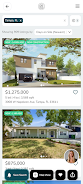
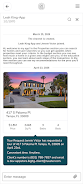
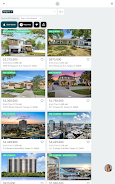
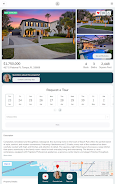
The app combines a searchable listing portal with curated articles and practical checklists that cover every step of the purchase process. Real-time search and saved searches let you narrow listings by price, beds, neighborhoods, and commute time, and receive alerts when matching homes appear or change price. In-app messaging allows direct conversations with agents, and you can attach tour photos or notes to a listing for reference. LKG Home Group also links to trusted loan officers for pre-approval assistance and lists vetted local vendors for inspections, repairs, and moving services so coordination is faster and more transparent.
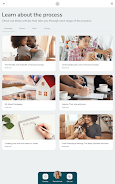
Practical guides and checklists in the app act like a roadmap, breaking the transaction into manageable milestones: research, budgeting, mortgage pre-approval, offer preparation, inspections, and closing. Each milestone includes action items you can check off, space to store documents, and recommended next steps so you always know what comes next. The app’s searchable history and saved listings make it simple to revisit earlier choices, compare properties side-by-side, and share specific entries with family or an agent.
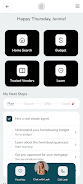
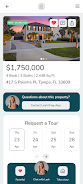
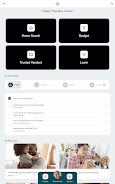
Navigation in the app is designed to be straightforward: a main search bar plus filters for common criteria, a saved items area for quick access, and an activity stream that aggregates messages, alerts, and checklist progress. Controls are touch-friendly and optimized for phones and tablets, with clear buttons to schedule viewings, upload images from your device, and message contacts. The interface uses progressive disclosure so you see essential information first and can expand details when you need them, reducing clutter while keeping full functionality one tap away.
Rather than abstract levels, the app uses a progression model built on task completion. You advance by completing checklist items—getting pre-approved, scheduling an inspection, or confirming a closing date—which unlocks recommended content tailored to your next steps. This task-oriented approach creates a clear sense of progress during a process that is often complex, and it surfaces helpful articles and local service options as you hit each milestone to reduce friction and decision fatigue.
Customization centers on saved searches, notification preferences, and personal notes attached to listings. You can tailor alerts to specific neighborhoods or price bands and adjust how often you receive updates. The app stores viewing notes and photos, allowing you to revisit past tours and re-evaluate properties over time; this archival ability increases the app’s replay value because you can reuse checklists and workflows for multiple purchases or when helping friends or family through the process.
The visual design emphasizes readable typography, clean card-based listing layouts, and consistent iconography so information is scannable. Color choices and contrast aim to support readability in varied light conditions. Accessibility features include adjustable text sizes, clear touch targets, and an interface structure that supports screen readers and simple keyboard navigation patterns for users who rely on assistive technologies.
The app is built to minimize disruptions when connectivity is intermittent: key articles, checklists, and recent searches are cached so you can reference them offline during property visits. Alerts and messages sync automatically when you regain signal. Data storage and export options let you keep copies of notes and checklists outside the app for your records, helping ensure information remains available across devices.
Because LKG Home Group focuses on the Tampa, FL market, some listings, vendors, and agent connections are region-specific; users outside the area will find reduced local utility. Vendor availability may vary and the vetted provider list is curated rather than exhaustive, so users should supplement the app’s recommendations with personal research or referrals. The app is designed to support buyer workflows but does not replace professional legal, financial, or inspection advice.
File size: 8.36 M Latest Version: 1.0.0
Requirements: Android Language: English
Votes: 452 Package ID: com.ruuster.android.lkghomegroup.app
Developer: VIP Client Portal


Must Have Home Apps for Android
Make your house a home with our suite of helpful home apps. Discover clever tools to organize closets, streamline chores, and simplify cooking. Take the stress out of cleaning and maintenance with handy checklists and schedules. Enhance security and control appliances and lighting with our smart home integrations. Design, visualize, and renovate like a pro using our 3D planning software.






LIVE A HERO
Retro Hero Mr Kim
Empire of Passion
Arcane Quest Legends
Magic Snap: Momotaro
AllStar Manga Heroes
Lunescape
ONE PIECE Thousand Storm JP
Tap Titans 2