Scan to Download
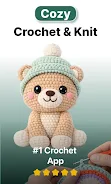
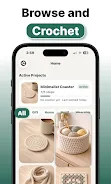
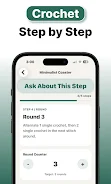
Crochet is a beginner-friendly app that teaches the fundamentals of crocheting and guides you through small, practical projects from yarn setup to finishing rows with confidence. Designed for people who have never picked up a hook as well as those returning to the craft, Crochet combines clear step-by-step lessons, project-based learning, and helpful workflow tools so newcomers can build skills without feeling overwhelmed. The app pairs simple lessons with guided projects, a built-in stitch and row counter, and planning helpers to make practicing stitches and completing patterns easier and more enjoyable.
Key features in Crochet are organized to support a steady learning curve and real progress on projects. The lesson curriculum breaks down core stitches and techniques into short, focused units that include photos, explanatory text, and example rows so you can practice immediately. Guided projects are grouped by difficulty and show you how individual stitches combine into finished items, giving both immediate wins and a path to more complex work.
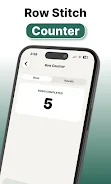
The app includes an integrated stitch counter and row tracker that you can control with simple touch gestures: tap to increment, long-press to adjust, and swipe to move between rows. A planning and sizing tool helps estimate finished dimensions and stitch counts based on hook size and yarn weight, making it easier to match gauge and avoid surprises. Crochet also offers photo-based stitch identification powered by on-device AI that suggests likely stitch types from a clear image, helping when a pattern or stitch looks unfamiliar.
Progression in Crochet is structured around lessons and projects rather than abstract points. As you complete lessons you unlock related guided projects, and each project shows progress at a glance with a percent complete indicator and a visual timeline of key steps. The app encourages steady practice with short, repeatable tasks and optional daily or weekly practice goals that you can set for yourself. Practice sessions and project milestones help you track improvement and return to techniques that need a little more work.
Crochet uses straightforward, touch-friendly controls to make following patterns while you work simple and safe. Images and pattern diagrams support pinch-to-zoom so you can examine stitch detail, and navigation between lesson steps uses clear forward/back controls so you never lose your place. The interface focuses on readability with well-spaced instructions and labeled photos, and a built-in notes area lets you record yarn, hook, and tension details for each project.
The visual style favors practical clarity: crisp photos, enlarged stitch close-ups, and easy-to-scan pattern steps that mirror the way makers work at their table. Lessons are arranged in a progressive level structure, beginning with practice stitches and short swatches, moving to small items like dishcloths and simple accessories, and then to larger guided projects. Each level emphasizes technique consolidation, so repeating a lesson with different yarns or hooks gives meaningful variation and replay value.
Crochet offers customization options that keep projects relevant to your materials and preferences: input your yarn weight and hook size, adjust target dimensions with the sizing calculator, and save multiple project profiles. Replay value comes from practicing the same technique with different materials and using the app’s project templates to adapt patterns. Many lessons and the core stitch counter work offline so you can use the app at your maker table without a network connection; larger pattern downloads and premium content are available when you have internet access.
The app is designed with accessibility in mind through readable text sizes, high-contrast diagrams, and step pacing that lets you move forward at your own speed. For users who want structured encouragement, Crochet includes milestones and optional practice challenges that reward consistency—simple completion goals and project milestones designed to increase confidence rather than introduce competition. Photo-based stitch recognition is intended as an assistant and works best with clear, well-lit images.
✅ Designed for new makers but also useful as skills grow, Crochet supports continued learning with project-based progression and practical tools in one place. The combination of lessons, project flow, and integrated counters helps reduce frustration and makes finishing projects more achievable.
❎ Several lessons, additional patterns, and premium planning tools require a paid upgrade to access. The free tier limits the number of active projects you can keep at once, and the photo-based stitch identification is helpful but may need manual confirmation, especially if images are dark or unclear. Device camera quality can affect identification accuracy.
File size: 162.48 M Latest Version: 1.0.1
Requirements: Android Language: English
Votes: 304 Package ID: com.crochet.flingex
Developer: Flingex

Must Have Tools Apps for Android
Equip yourself with our all-in-one toolbox app for everyday tasks and projects. Instantly convert between units, calculate tips, scan documents, manage files, and more with handy productivity tools. Includes a level, compass, QR code reader, ruler, speedometer, decibel meter, and flashlight. Save frequently used tools to your customizable dashboard for one-tap access. Track billable hours, wages, budgets, and invoices. Annotate screenshots, magnify labels, and sign PDFs on the go.




LIVE A HERO
Retro Hero Mr Kim
Empire of Passion
Arcane Quest Legends
Magic Snap: Momotaro
AllStar Manga Heroes
Lunescape
ONE PIECE Thousand Storm JP
Tap Titans 2