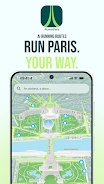
RunninParis turns everyday runs through the city into guided, data-aware outings by generating tailored routes that balance comfort, scenery and your chosen pace. With a simple start address you can ask the app to create a loop or a point-to-point itinerary, preview options in 3D, compare scores that use official Paris open data, and export GPX files for use on most watches and fitness devices. RunninParis streamlines planning so locals and visitors alike can discover quieter streets, greener corridors and more interesting neighbourhoods without fuss.
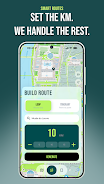
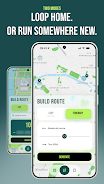
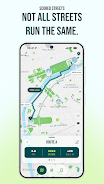
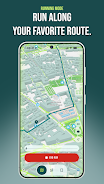
The core interaction in RunninParis is conversational and map-driven rather than gamified: enter a start point or drop a pin, choose Loop or Itinerary mode, select a target distance or time, and the app proposes several alternative routes. Controls are designed for quick decisions on the phone and minimal distraction while running: swipe to switch candidate routes, tap to view score breakdowns, pinch to zoom the map, and use a single button to start Running Mode. Running Mode simplifies the interface to a live blue dot, an unobtrusive trace of your path and pace readouts so you can focus on the run rather than navigating menus.
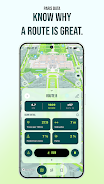
Every proposed route is evaluated with explicit, transparent factors sourced from Paris open datasets such as sidewalk width, tree canopy cover, pedestrian zones and park locations. RunninParis displays a clear score breakdown so you can decide whether you prefer a quieter sidewalk, a greener path or a more scenic alignment. Progression is personal rather than competitive: the app saves your route history and favourites, tracks cumulative distance and pace trends over time, and suggests new routes that gradually expand your familiar area. Those saved routes act like milestones and help the app offer progressively more varied itineraries tailored to your past preferences.
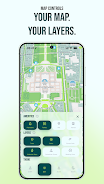
Customization in RunninParis focuses on visibility and relevance rather than cosmetic gimmicks. You can tweak which map layers are shown by default, for example turning on pedestrian zones, parks, seating or street tree overlays. Theme presets adjust color contrast and iconography for daytime runs, night visibility, or a high-contrast accessibility mode. Users can also weight scoring criteria to favour comfort, scenery or directness when generating routes, so each run can be adapted to training days, recovery jogs or sight-seeing strolls.
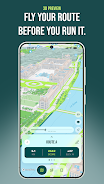
The visual presentation combines clear cartography with subtle 3D previews that help you understand elevation and sightlines before you go out. Routes are organised into simple structures: short loops for warmups, medium circuits for regular training, and longer point-to-point options for exploration. The 3D fly-through is useful for assessing turns and open spaces, while the map view highlights surface and amenity data so you can anticipate benches, parks or quieter segments along the way.
Replay value in RunninParis comes from variety and local discovery rather than incremental power-ups. Because routes are generated from live datasets and your own history, similar start points can produce different outings depending on the weighting you choose. The app includes device-side challenges designed to increase exploration: for example, a self-guided goal to run a set number of green routes or visit several distinct arrondissements. These challenges are stored locally, encourage repeat runs, and do not require online accounts or social features.
User experience emphasizes low distraction and resilient operation. Running Mode limits notifications and simplifies the display for safe on-street use. Accessibility options include larger map controls, a high-contrast theme and concise spoken cues that can be enabled for turn prompts. RunninParis supports offline use by allowing map tiles and route details to be cached before a run and by exporting GPX files that work without an internet connection, so you can navigate a planned route in areas with poor reception.
While RunninParis uses detailed Paris data, its scoring and layer accuracy are optimised for the city and may not translate outside that area. Live tracking and turn-by-turn guidance rely on GPS quality and compatible wearable devices; exported GPX files are intended for broad compatibility but specific watch integrations depend on the device. The app prioritises clear, explainable route choices over opaque shortcutting, and it keeps all saved routes and challenge progress local to the device unless you choose to export or share them manually.
File size: 79.91 M Latest Version: 1.1.0
Requirements: Android Language: English
Votes: 154 Package ID: com.runninparis.app
Developer: Luca Perrin

Top Free Fitness Necessary Apps for Android
Reach your fitness goals and maximize workouts with our revolutionary exercise apps. Track progress, log workouts, and analyze performance using our intuitive tracking tools. Follow customized training plans tailored to your level and interests. Learn new exercises and techniques with our video instructional library. Monitor heart rate, calories burned, and other metrics to optimize your routine.






LIVE A HERO
Retro Hero Mr Kim
Empire of Passion
Arcane Quest Legends
Magic Snap: Momotaro
AllStar Manga Heroes
Lunescape
ONE PIECE Thousand Storm JP
Tap Titans 2