Scan to Download
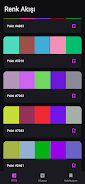
Hueflow puts a simple, distraction-free color studio on your device so designers, programmers and color enthusiasts can find and build palettes quickly. The app surfaces hundreds of randomly generated trending color combinations on a scrolling homepage, plus tools to name, blend and save custom palettes. Hueflow’s minimalist interface keeps workflow fast: create a palette, add it to a personal collection, or remove unwanted picks with a quick swipe. Because palettes are stored locally, the app focuses on privacy and straightforward utility—ideal for anyone who wants instant inspiration without juggling accounts or cloud clutter.
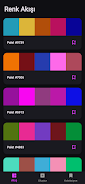
⭐ Endless Color Flow: Hueflow displays hundreds of randomly generated, trending palettes on a continuous scrolling homepage so you can browse until inspiration strikes.
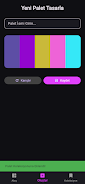
⭐ Design Your Own Palette: Give a palette a name, mix colors and use the blend feature to create smooth harmonies in seconds.
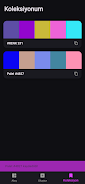
⭐ Create Your Collection: Save favorite palettes to a personal collection and access them instantly when needed.
⭐ Easy Management: Swipe sideways to quickly delete palettes you no longer need from your collection.
⭐ Minimalist Interface: A clean, user-friendly layout that focuses on color discovery without unnecessary distractions.
✅ Local and Private: Hueflow stores colors and palettes only on your device, keeping your work private and under your control.
✅ Fast Inspiration: Randomized palettes and endless scrolling help you generate fresh ideas quickly.
✅ Simple Workflow: Naming, blending and saving palettes is straightforward and easy to learn.
✅ Tailored for Creatives: Useful for designers, developers and color enthusiasts who need quick, ready-made color combinations.
❎ No cloud sync: Local-only storage means collections won’t automatically appear on other devices.
❎ Randomized feed can be hit-or-miss: You may need to scroll through many palettes before finding the exact combination you want.
❎ Minimalist design may not include advanced color-editing tools some professionals expect.
File size: 31.49 M Latest Version: 1.0.0
Requirements: Android Language: English
Votes: 195 Package ID: com.ruzgar.hueflow
Developer: RUZSOFT

Must Have Tools Apps for Android
Equip yourself with our all-in-one toolbox app for everyday tasks and projects. Instantly convert between units, calculate tips, scan documents, manage files, and more with handy productivity tools. Includes a level, compass, QR code reader, ruler, speedometer, decibel meter, and flashlight. Save frequently used tools to your customizable dashboard for one-tap access. Track billable hours, wages, budgets, and invoices. Annotate screenshots, magnify labels, and sign PDFs on the go.






LIVE A HERO
Retro Hero Mr Kim
Empire of Passion
Arcane Quest Legends
Magic Snap: Momotaro
AllStar Manga Heroes
Lunescape
ONE PIECE Thousand Storm JP
Tap Titans 2