MASBO2025 is the official mobile companion for the 2025 MASBO Summer Conference, created to help attendees plan, navigate, and get the most from each day of programming. With an emphasis on quick access to session information, speaker and exhibitor details, and real-time organizer updates, MASBO2025 puts your personalized conference agenda and essential logistics into one clean, searchable interface on your phone.
The app consolidates the full conference schedule so you can browse sessions by time, track, or location and build a personal agenda that stays synced to your online account. Searching and filtering tools let you narrow sessions by topic or presenter, and session pages include practical details such as room location, start and end times, and a short session summary that helps you choose where to be next. Speaker and exhibitor profiles provide bios, contact details, and exhibitor booth identifiers to make planning meetings and follow-ups straightforward.
MASBO2025 also supports simple note-taking and bookmarking on each session entry so you can capture key takeaways as you go. These notes are stored locally for offline access and synchronized with your account when a connection becomes available, ensuring you won’t lose your selections or annotations even when network coverage is poor.
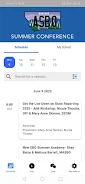
The app is designed for fast, one-handed navigation with familiar controls: swipe to move between days, tap to expand session details, and long-press or a dedicated icon to add a session to your personal agenda. Search is front-and-center, and filters persist as you refine results so you spend less time digging and more time planning. Visual cues and consistent layout help visitors find room numbers and schedule changes at a glance.
Rather than game-style progression, MASBO2025 focuses on planning progress: you create a tailored agenda before the conference, refine it during the event, and then retain an archive of sessions and notes for later review. This progression makes the app useful both during the week of the conference and afterwards, when you’re compiling follow-up tasks, contacting presenters, or revisiting materials you saved. Because session selections and notes are preserved, the app remains a valuable reference until the next event.
The visual presentation balances clarity with compactness: calendar-like day views provide an overview of concurrent sessions while session detail screens prioritize readable text and clear location labels. Sessions are grouped by track or topic so you can treat each track like an organized set of levels to explore at your own pace. The straightforward typography and color contrasts emphasize legibility in busy, conference-floor lighting conditions.
Customization centers on your personal agenda and how information is displayed. You can sort sessions by start time or relevance, save favorites for easy access, and adjust display preferences such as text size for readability. Syncing with your online attendee account preserves these settings across devices so changes you make on a tablet or desktop are reflected instantly on your phone.
MASBO2025 includes features to support broad accessibility and offline use: cached session data and notes are available without a network connection, a data-light mode reduces bandwidth use, and interface elements are sized and labeled for compatibility with screen readers and larger font settings. Offline caching also lets attendees rely on the app in venues with limited cellular reception, keeping schedules and essential contacts at hand.
Push notifications relay important organizer messages such as room changes, schedule updates, and last-minute reminders. Notifications are concise and actionable so you can decide whether to update your agenda or head to a different room. Organizer-driven feeds and alerts keep you informed of any adjustments that would affect your daily plan.
To save and synchronize a personalized agenda across devices you will need to sign in with an attendee account; this requirement enables cross-device continuity but means some features are limited if you do not register. Additionally, the app’s primary value centers on the conference dates and the organizer-supplied content, so some sections naturally become less active after the event concludes. Privacy and data use are handled by the event organizers, and the app is designed to minimize unnecessary data collection while retaining essential sync functions.
The MASBO2025 app was built by a development team experienced in registration and attendance management tools, with a focus on simplifying complex multitrack schedules and improving the attendee experience through reliable syncing, clear session information, and robust offline support. Support contact information is available within the app for troubleshooting and to report missing or incorrect session details.
Whether you are attending your first MASBO conference or returning for new sessions, MASBO2025 helps you stay organized, adapt to on-the-fly changes, and keep a usable record of what you saw and who you met, making the most of your conference experience long after the final session ends.
File size: 56.13 M Latest Version: 1.54.3
Requirements: Android Language: English
Votes: 102 Package ID: com.sched.masbosummerconferencetwofive
Developer: MASBO

Must Have Communication Apps for Android
Connect deeper through meaningful conversations with our communication apps. Enjoy crystal-clear calls, video chats, messaging, and file sharing. Find the perfect emojis, GIFs, and stickers to express yourself. Keep the non-stop group banter organized in one place. Block unwanted interactions at the source. Meet new people worldwide through our global community features.






LIVE A HERO
Retro Hero Mr Kim
Empire of Passion
Arcane Quest Legends
Magic Snap: Momotaro
AllStar Manga Heroes
Lunescape
ONE PIECE Thousand Storm JP
Tap Titans 2