
Scan to Download
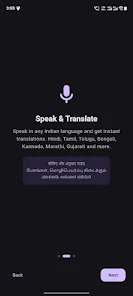
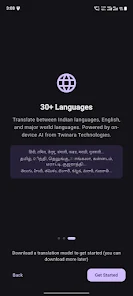
Twinara Translator is a privacy-first translation app that runs entirely on your phone and lets you translate speech, text and live conversations without sending data to the cloud. It supports major Indian languages such as Hindi, Tamil, Telugu, Bengali, Kannada, Marathi, Gujarati and Urdu, along with more than 30 world languages, and includes voice input, two-person conversation mode, camera OCR and natural text-to-speech. The on-device design means translations are fast, usable offline after an initial setup, and suitable for users who prioritize privacy, need reliable tools while travelling, or want a compact AI-enabled translator that respects local data storage.
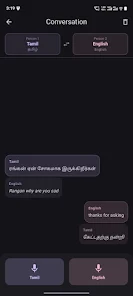
The app offers on-device processing for both speech and text so your phrases, transcripts and conversations remain on your device rather than being uploaded to servers. Voice input accepts natural spoken phrases and can recognise common code-mixed speech such as Hinglish and Tanglish, which helps when speakers mix languages mid-sentence. Two-person conversation mode allows two users to speak different languages into the same device and receive near-instant translations played back with clear text and natural-sounding voices. Camera translate uses OCR to capture signs, menus or printed text and overlay translations directly on-screen so you can read foreign signs quickly. Text-to-speech provides natural voices with adjustable speed to help you learn pronunciation or speak through the device in another language. Translation history stores recent phrases for quick reuse while a simple phrasebook approach helps you save and review common translations. Basic access is free with ads and essential tools, while a Premium option unlocks additional languages and premium features.
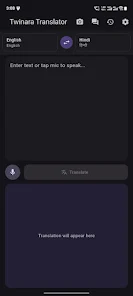
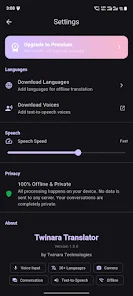
The interface is designed for familiar, phone-native controls: a prominent microphone button starts live voice translation, a text box supports typing and copy-paste, and a camera icon launches the OCR mode. Conversation mode is activated by a dedicated toggle and shows two clear speaker areas on screen so each participant can see translated output in their preferred language. Playback controls allow pausing, repeating and changing voice speed, and there are simple menu actions to delete history entries or pin frequently used phrases. Language packs are managed from a settings screen where you can download and remove offline languages, view installed pack sizes, and choose default input and output languages for faster access. The app also shows confidence scores for recognized speech so you can decide whether to retry or edit the source text before translating.
After the initial setup the core translator runs without an internet connection, which makes the app practical for train journeys, remote work sites and travel to areas with limited data. Offline functionality relies on downloadable language packs that you add over time, allowing you to expand capabilities as you need them and manage storage by removing unused packs. Progression in everyday use comes from saving and revisiting translations, creating a small personal phrasebook, and using the text-to-speech feature to practice pronunciation. Customization options include choosing voice variants, adjusting speech rate and selecting dark mode for low-light readability, all of which help tailor the experience to different users and environments.
The app presents a clean, readable layout with large text options and a high-contrast palette for easier reading in bright sunlight or on small screens. Dark mode reduces eye strain during night-time use and controls are sized for one-handed operation on phones. Accessibility features include support for screen readers, adjustable font sizes, tactile feedback for control presses and clear visual cues when speech is being processed. Natural-sounding TTS voices and a replay function make it simpler to practise phrases aloud, while the conversation UI highlights each speaker so follow-up responses are easy to track. These design choices aim to make translations approachable for travellers, professionals and language learners alike.
Twinara Translator works well as a travel companion for reading signs and menus, as a workplace tool for short conversations and document previews, and as a learning aid for repeating phrases and tracking progress through the history feature. The replay value comes from frequent real-world reuse, the convenience of offline operation and the ability to build a personal phrase list over time. Limitations include an initial download step to enable offline packs, some advanced features such as full access to all 30+ languages and camera translation being gated by the Premium subscription, and the presence of ads in the free tier which can be removed by upgrading. Accuracy depends on background noise and pronunciation, so very noisy environments may require moving closer to the speaker or typing the source text.
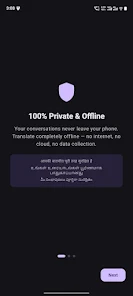
The app processes speech and text locally by default, so conversations and input do not leave your phone unless you choose to share them. A paid Premium tier removes ads, expands the number of available offline languages, and unlocks certain convenience features for a monthly fee of ₹99; core translation and offline basics remain available in the free version. Twinara Translator is positioned for users who need fast, private translations on-device and prefer the control of local data storage while still having the option to upgrade for expanded language coverage and additional tools.
File size: 92.00 M Latest Version: 1.0.2
Requirements: Android Language: English
Votes: 220 Package ID: com.twinara.translator
Developer: Twinara Technologies

Best Free Travel Apps for Your Android Phone
Make travel planning effortless with our all-in-one trip companion app! Get insider tips from locals on top attractions, hidden gems, restaurants, and accommodations at your destination. Book flights, rental cars, and hotels at the lowest prices. Access maps offline; track bookings, itineraries, and reservations; create shared group trips; and auto-translate menus, signs, and conversations abroad. Our clever algorithms surface personalized recommendations everywhere you go.






LIVE A HERO
Retro Hero Mr Kim
Empire of Passion
Arcane Quest Legends
Magic Snap: Momotaro
AllStar Manga Heroes
Lunescape
ONE PIECE Thousand Storm JP
Tap Titans 2