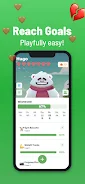
GymGains is a focused fitness tracking app designed to help you record workouts, monitor weight and visualize progress so staying motivated becomes a straightforward part of your routine. GymGains emphasizes simple, repeatable actions: log your gym visits, take and store progress photos, and consult clear charts that show trends over days, weeks and months. The interface is built to reduce friction during busy sessions while still offering enough detail to compare results with friends or to revisit past entries when planning your next training block.
The core feature set centers on reliable logging and transparent visual feedback. You can record each gym visit with session details, enter body weight points to generate trend charts, and save progress photos that line up with dates so visual changes are easy to review. Weekly goals let you set short-term targets and check completion at a glance, while the friends comparison feature adds a social dimension that encourages accountability without forcing competitive tracking. Charts are presented in a clean layout so gains and plateaus are simple to spot.
Logging in the app follows a straightforward flow: create a session, add brief notes or key numbers and save. Controls are designed for one-handed use during workouts – quick-add buttons, simple date pickers and camera access for progress photos reduce the time you spend interacting with the phone. Session details can include duration and a short description of focus (for example, strength, cardio or mobility), which helps you build a practical history of what you did on specific days and how that relates to weight or visual changes.
Progression in GymGains relies on measurable, repeatable milestones rather than prescriptive programming. Weekly goals and streak tracking encourage consistency, while visual charts translate small day-to-day changes into meaningful trends. The app highlights recent milestones such as reaching a target weight range or maintaining a weekly attendance streak, so you can see how incremental efforts add up over time. This structure supports gradual habit formation and reduces reliance on dramatic short-term results.
The visual style leans toward clarity and contrast: readable charts, labeled axes and side-by-side photo comparisons make it easy to interpret your history. Color cues indicate upward or downward trends and simple icons mark goal completion. The interface avoids clutter so primary actions – logging a session, adding a photo, or checking a chart – remain obvious. This straightforward presentation helps users focus on data, not decoration.
GymGains adapts to different tracking preferences by letting you choose units for weight, set personalized weekly targets and label sessions to match your routine. Photo privacy settings give you control over which images are visible in the friends comparison view, and you can rename or categorize sessions to reflect your training split. These options allow the app to serve both people who want minimal tracking and those who prefer slightly richer context for each entry.
The app emphasizes ease of use and accessibility. Buttons are sized for quick tapping, fonts are legible at common display sizes, and color contrast is chosen to remain readable in varied lighting. For users relying on screen readers or larger text, the app maintains a consistent hierarchy so navigation remains predictable. Small touches like auto-saved photo drafts and a reduced-interaction logging flow improve the experience for users who are active in the gym and have limited time to enter data.
GymGains works without a constant internet connection: you can log visits, update weight and take photos while offline, and your entries remain stored on the device until you choose to share or back them up. Data is presented locally so you can review charts and photos at any time, which is useful for training sessions in signal-poor gyms or when traveling. The app’s design keeps data access straightforward so you control how and when information leaves your device.
Social features in GymGains are intentionally light-touch. The friends comparison lets you view a peer’s public progress snapshots and basic trends, which can motivate without creating public leaderboards or pressure to perform. Personal challenge options are handled through adjustable weekly goals and self-set milestones rather than built-in competitive ranking. This keeps the social aspect supportive and optional for users who want accountability.
Because the app prioritizes flexible tracking, it relies on manual logging for workouts and photos; users seeking fully automated tracking or guided coaching programs will need a companion tool or trainer. The description does not reference built-in workout plans or active coaching features, so GymGains performs best as a reliable journal of activity and progress rather than a prescriptive training system.
GymGains is a good fit for gym regulars, people tracking weight changes or visual transformations, and anyone who prefers a lightweight, device-centered tracker that prioritizes clarity over complexity. If you want a straightforward way to record sessions, monitor trends, and keep motivation high with simple social accountability, GymGains offers a practical toolkit to support consistent progress.
File size: 58.77 M Latest Version: 1.1.6
Requirements: Android Language: English
Votes: 225 Package ID: com.nubt.gymgains
Developer: NUBT




Top Free Fitness Necessary Apps for Android
Reach your fitness goals and maximize workouts with our revolutionary exercise apps. Track progress, log workouts, and analyze performance using our intuitive tracking tools. Follow customized training plans tailored to your level and interests. Learn new exercises and techniques with our video instructional library. Monitor heart rate, calories burned, and other metrics to optimize your routine.



LIVE A HERO
Retro Hero Mr Kim
Empire of Passion
Arcane Quest Legends
Magic Snap: Momotaro
AllStar Manga Heroes
Lunescape
ONE PIECE Thousand Storm JP
Tap Titans 2











































