
Scan to Download
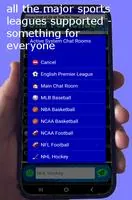
Chirper Chat is a free live chat room app for sports fans aged 18 and older that puts the communal feel of a pub-fan crowd into a lightweight mobile interface while games are on. The app pairs live scoreboards for NHL, NBA, NFL, MLB, NCAA football and basketball, and the English Premier League with public and private chat rooms so groups of friends can follow play-by-play action together from anywhere. Setup is intentionally minimal — choose a username, a chat name and a password — and the design keeps focus on conversation, live stats and quick movement between rooms.
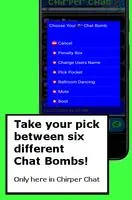
Chirper Chat combines synchronized scoreboards and room-based chat so you always know the game state while you type. Public rooms host broader discussion around a game, while private rooms let small groups continue conversations away from the main feed. The app’s point system rewards activity and can be spent on playful actions such as Chat Bombs that animate or highlight interactions within a room, creating a social progression loop without complicated leveling systems. Moderation tools are built into each room: hosts can use the Penalty Box for temporary removals, force name changes to discourage abuse, Picking Pockets to reclaim points, mute disruptive users, or apply The Boot for permanent removal from a room.
Controls are gesture-driven and optimized for quick interaction during live events. Tap any message to open the Chat Bomb menu and access context-sensitive actions; a left-side sliding menu exposes profile controls, audio toggles, the Pulse status indicator, and a Save & Exit option that preserves your place. Notifications and presence settings are grouped in the same compact panel so you can tune alerts by room or by league. The interface emphasizes clarity over clutter: chat timestamps, simple message input, and inline scoreboard strips keep essential information visible while you type.
The progression system is lightweight and social rather than competitive. Activity-based points accumulate as you participate and can be spent to trigger chat effects or to access small cosmetic tweaks like user-level emoji variations and name decorations that are visible to other app users. Points reset or change hands through in-room interactions such as Picking Pockets, encouraging playful exchanges instead of rigid rank advancement. Customization centers on your display name, chat name, emoji set and notification preferences, all configurable from the sliding menu without lengthy menus or account procedures.
Room moderation is a first-class part of the experience and designed for quick, transparent management of behavior in live environments. Hosts can take graduated actions — warnings, temporary penalty box placement, forced name changes, or removal — and these tools are visible to participants so room rules stay clear. Chirper Chat requires minimal personal data at signup and does not display ads; only a username, chat name and password are requested. The app is intended for adults 18+, and community guidelines encourage respectful conversation during heated game moments.
The visual design favors a compact, readable layout: clear typography for live text, high-contrast scorelines, and a slim sliding menu that keeps controls within thumb reach. User-level emojis are optimized for Android 10 and above, and text size plus color contrast settings help those with visual needs. The app uses modest data by default and avoids heavy animations to keep performance steady on mid-range devices. While full offline play is not available for live rooms, basic preferences and recent room choices are retained locally so you can reconnect quickly after a brief signal drop.
Replay value comes from the real-time nature of sports: every game produces new conversation, scoreboard changes and situational humor that encourage repeat visits. A typical session starts with selecting a league or game, joining either the Main Chat or a private room, following the integrated scoreboard, and using points or Chat Bombs to add flavor to exchanges. Notifications and presence indicators help you jump back into action at key moments, and seamless switching between public and private rooms keeps social groups together across multiple games.
The service is designed for adults and is not suitable for younger users under 18. Some older Android devices may not display the full set of user-level emojis, and because the app centers on live events it requires an active connection for full functionality. The emphasis is on social chat and live stats rather than formal rankings or tournament-style systems, so expect casual, conversation-driven experiences rather than competitive ladders.
File size: 10.67 M Latest Version: v2.77 Strange Brew
Requirements: Android Language: English
Votes: 236 Package ID: appinventor.ai_carlos_comiomucho.LiveChat
Developer: WTFsoftware USA







Top Events Free Apps for Android
Discover and share the hottest events around with our intuitive apps. Find local concerts, festivals, shows, and more based on your unique interests. Create customizable calendars of upcoming events to coordinate schedules with friends. Purchase tickets seamlessly from our integrated platforms. Check real-time transit schedules to plan your trip. Access maps, directions, and parking information for any venue.






LIVE A HERO
Retro Hero Mr Kim
Empire of Passion
Arcane Quest Legends
Magic Snap: Momotaro
AllStar Manga Heroes
Lunescape
ONE PIECE Thousand Storm JP
Tap Titans 2