Scan to Download
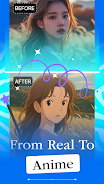
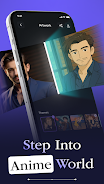
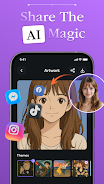
AI Photo - AI Generator is a mobile photo tool that turns ordinary pictures into anime-style artwork and avatars using on-device AI. AI Photo - AI Generator makes one-tap transformations simple and AI Photo - AI Generator provides stylistic filters with HD export for social sharing. This editor-friendly app focuses on fast, privacy-respecting processing right on your device so you can experiment with looks and save polished results without relying on cloud uploads.
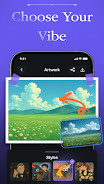
The app delivers a selection of artistic presets and texture options so you can convert a selfie into an anime-inspired avatar, a vibrant wallpaper, or a refined portrait suitable for professional profiles. AI Photo - AI Generator includes controls for resolution, color palette, and background treatment, and it supports export in formats suitable for social media or printing. Rather than overwhelming users with technical jargon, the tool presents clear presets and adjustable sliders so both beginners and experienced editors can reach desirable results quickly.
Operation is straightforward: upload a headshot or full-frame photo, choose a style category, and fine-tune parameters with simple touch controls. The primary controls are exposure and contrast adjustments, a style strength slider that blends the original image with the generated artwork, and a background smoothing option that helps isolate subjects. AI Photo - AI Generator also offers a preview step where you can compare before-and-after images and step back to refine settings without reprocessing from scratch.
Styles are grouped into categories such as classic anime, soft watercolor, crisp vector, and cinematic portrait. Each category contains variations that emphasize line work, color saturation, or texture, allowing you to tailor the final mood. Beyond presets, users can save custom parameter sets as named presets to reuse later, creating a personal library of looks that matches a brand, profile aesthetic, or creative series.
Rather than a linear progression system, the app encourages iterative improvement: you build skill by exploring styles, saving favorite presets, and refining camera capture techniques. As you learn which lighting and composition produce the best transformations, your results improve. Batch processing tools let you apply a saved preset to multiple photos in sequence, speeding up projects like avatar updates or theme-based wallpapers. This combination of discovery and repeatable workflows gives the app lasting replay value for content creators and hobbyists alike.
AI Photo - AI Generator prioritizes high-definition output so images remain sharp when shared or printed. The on-device processing balances quality with speed and is optimized for modern mobile hardware; preview thumbnails appear quickly while full-resolution exports take slightly longer depending on device capability. The app includes an option to limit export resolution to save storage or speed up processing on older devices, and it minimizes battery impact by batching heavier jobs for times when the device is charging.
The interface presents a clear single-column workflow with labeled controls and inline tips that describe what each slider does, making the experience approachable for users with varying familiarity with image editing. Touch targets are sized for easy tapping and the app supports dynamic text scaling for users who require larger type. Colorblind-friendly preview toggles and simple contrast adjustments help ensure the final result reads well for a broader audience.
All primary image transformation happens locally, so you can use AI Photo - AI Generator offline or in low-connectivity situations without sending images to remote servers. This approach reduces latency and keeps personal photos on your device. The app provides clear settings for managing saved projects and exported files, and it documents which optional permissions are needed for full functionality so you can make informed choices about storage and camera access.
Results are influenced by the source photo: good lighting, focused subjects, and moderate background complexity generally produce the cleanest conversions. Stylized anime conversions are interpretive, so exact replication of a specific reference is not guaranteed and repeat attempts with slightly different inputs can yield preferred outcomes. Occasionally small artifacts may appear around fine details; in such cases, minor tweaks or a retake typically resolves the issue. These constraints are addressed in the app’s help section, which provides tips for framing, lighting, and choosing styles that match your photo.
AI Photo - AI Generator is a practical tool for casual users who want a playful avatar, content creators seeking a consistent visual identity, and anyone curious about on-device creative tools. It strikes a balance between simplicity and control by offering easy presets alongside deeper parameter adjustments, so you can either generate a finished image in seconds or spend time fine-tuning a polished portrait.
File size: 53.60 M Latest Version: 1.1.3
Requirements: Android Language: English
Votes: 335 Package ID: com.ghibli.ai.photostyle.animecreator
Developer: Media Zclouds


Must Have Tools Apps for Android
Equip yourself with our all-in-one toolbox app for everyday tasks and projects. Instantly convert between units, calculate tips, scan documents, manage files, and more with handy productivity tools. Includes a level, compass, QR code reader, ruler, speedometer, decibel meter, and flashlight. Save frequently used tools to your customizable dashboard for one-tap access. Track billable hours, wages, budgets, and invoices. Annotate screenshots, magnify labels, and sign PDFs on the go.






LIVE A HERO
Retro Hero Mr Kim
Empire of Passion
Arcane Quest Legends
Magic Snap: Momotaro
AllStar Manga Heroes
Lunescape
ONE PIECE Thousand Storm JP
Tap Titans 2