Scan to Download
Bold Browser is a lightweight mobile web browser built for fast, private browsing and straightforward media management. From everyday web searches to saving videos for offline viewing, Bold Browser merges a familiar navigation experience with tools for downloading and organizing media so you can stay in a single app rather than switching between browser, downloader, and gallery. The app focuses on basics that matter: responsive tabbed browsing, quick access to favorite sites, a private mode that avoids storing local traces, and an integrated downloader and player for offline playback.
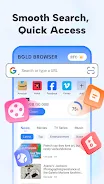
The core feature set centers on efficient browsing and media handling. Multiple tabs let you switch between pages quickly, while quick-access pins let you pin frequently visited sites to the homepage for one-tap entry. Bookmarks and history tools help you save and organize pages for later, and the private browsing (incognito) mode prevents local storage of history, cookies, and cache. A built-in video downloader detects downloadable media on visited pages and saves files to your device, and an integrated media player supports in-app playback of saved videos and audio without forcing you to export files to another app. Simple file management gives you basic tools to view, rename, sort, and remove pictures, videos, or audio stored by the browser.
Navigation in Bold Browser is intentionally familiar: the address bar accepts URLs and search queries, tabs are accessible from a dedicated switcher, and common actions are reachable with long-press or menu options. Downloading media typically requires tapping a detected download link or using a long-press on a playable item; once a download is queued, a small transfer indicator shows progress without interrupting your browsing. Tab controls include opening, closing, and reordering tabs so you can manage multiple pages efficiently. The app keeps commonly used controls near the bottom of the screen on most devices, helping thumb reachability when browsing on the go.
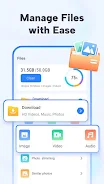
Downloaded files are stored in a simple local library inside the app where you can browse media by type, date, or filename. The built-in player offers straightforward playback controls such as play, pause, seek, and basic volume handling so saved videos and audio can be viewed offline without needing additional software. You can rename and remove files directly from the file manager to keep your storage organized, and the browser indicates file sizes so you can monitor how much space your media collection consumes. Offline playback is fully supported for files the app saves locally, making Bold Browser useful when you expect limited connectivity.
Home screen pins and bookmark folders allow customization of your personal start page and quick-launch items. The browser keeps the interface uncluttered, emphasizing readable page content and easy-to-reach navigation buttons. While the default layout favors simplicity, bookmark and pin organization let you tailor the app to match how you browse: group sites by topic, create a set of reference pages for work, or keep favorite media sources within a single tap. These small customization options help the app feel personalized without overwhelming you with settings.
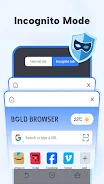
Private Browsing in Bold Browser is designed for users who want to avoid leaving local traces: it does not retain history, cookies, or cache after the session ends. For accessibility, the app is compatible with common system-level accessibility features such as screen readers and adjustable font scaling; it also prioritizes clear contrast and sizable touch targets for easier navigation. Performance-wise, the browser is tuned to be responsive on mid-range devices, but heavy pages or many simultaneous tabs can affect memory and battery usage, so occasional tab cleanup helps maintain snappy behavior.
Not every site allows media downloads; some services use protections that prevent saving videos or audio, and streaming platforms often restrict downloads by design. Media storage is limited by your device capacity, so large video collections require active space management. To get the best experience, monitor your download folder, remove files you no longer need, and use the built-in file manager to keep items organized. If a particular page does not offer a downloadable file, try checking the site’s own download options or use the browser to record the page address for later reference.
If you need help, want to report a bug, or have feature suggestions for Bold Browser, contact the developer at the2guys1122@gmail.com. The development team welcomes feedback and provides support via the listed email, and update notes include improvements to stability, download handling, and compatibility with newer devices whenever available.
File size: 94.70 M Latest Version: 2.8.0.0
Requirements: Android Language: English
Votes: 175 Package ID: com.ltcom.bold.pro
Developer: the2guys



Must Have Home Apps for Android
Make your house a home with our suite of helpful home apps. Discover clever tools to organize closets, streamline chores, and simplify cooking. Take the stress out of cleaning and maintenance with handy checklists and schedules. Enhance security and control appliances and lighting with our smart home integrations. Design, visualize, and renovate like a pro using our 3D planning software.






LIVE A HERO
Retro Hero Mr Kim
Empire of Passion
Arcane Quest Legends
Magic Snap: Momotaro
AllStar Manga Heroes
Lunescape
ONE PIECE Thousand Storm JP
Tap Titans 2