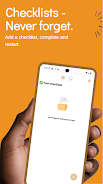
Checked is a lightweight checklist app built to simplify project tracking and keep work moving forward. It uses straightforward checklists so you can organize to-dos into projects, mark items complete, and reset lists when a cycle finishes. Whether you're managing personal chores or coordinating team tasks, Checked helps make progress visible so nothing slips through the cracks and deadlines are easier to meet. The interface focuses on simple actions—checking off tasks and reusing lists—so you can streamline routines, reduce overhead, and spend more time getting things done rather than managing the tool.
⭐ Mark tasks as completed with a simple check to track progress and stay motivated.
⭐ Reset projects after all items are checked so you can reuse checklists for recurring workflows.
⭐ Organize your to-dos into projects to separate personal tasks from team work.
⭐ Visual progress from checked items makes it easy to see what’s left at a glance.
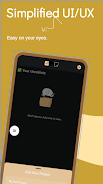
⭐ Checked focuses on clarity and minimalism to keep lists straightforward and focused.
✅ Checked helps prevent overlooked tasks by making completion visible and obvious.
✅ Streamlined checklist workflows reduce setup time and help maintain momentum through simple actions.
✅ The reset feature lets you reuse checklists for repeating routines without rebuilding them each time.
✅ Suitable for both individual use and basic team task tracking where a simple checklist is enough.
❎ Focused on checklist-style workflows, so it may not cover complex project planning needs like Gantt charts or resource allocation.
❎ Simplicity means fewer advanced features; power users might miss time tracking, detailed reporting, or automation.
❎ Workflows that require granular collaboration tools could find the feature set limited compared with full project-management suites.
File size: 65.53 M Latest Version: 0.4.1
Requirements: Android Language: English
Votes: 453 Package ID: com.kriteshtimsina.checklist
Developer: Kritesh Timsina

Must Have Tools Apps for Android
Equip yourself with our all-in-one toolbox app for everyday tasks and projects. Instantly convert between units, calculate tips, scan documents, manage files, and more with handy productivity tools. Includes a level, compass, QR code reader, ruler, speedometer, decibel meter, and flashlight. Save frequently used tools to your customizable dashboard for one-tap access. Track billable hours, wages, budgets, and invoices. Annotate screenshots, magnify labels, and sign PDFs on the go.






LIVE A HERO
Retro Hero Mr Kim
Empire of Passion
Arcane Quest Legends
Magic Snap: Momotaro
AllStar Manga Heroes
Lunescape
ONE PIECE Thousand Storm JP
Tap Titans 2