
Scan to Download
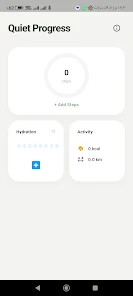
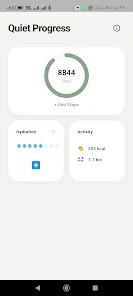
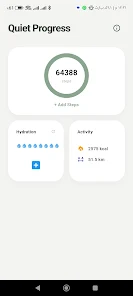
Zen Step Path is a manual activity logger that helps you record daily movement and water intake entirely on your Android device. It works offline and keeps all data stored locally, requiring manual entry for every step count and hydration log so you control what is tracked. If you prefer a privacy-focused utility that estimates calories and distance from your entries, shows progress with a circular display, and avoids cloud sync or background sensors, Zen Step Path provides simple controls and straightforward goal adjustments you can update throughout the day.
Zen Step Path offers manual step logging and a hydration counter with visual progress so you can enter and save daily totals directly and watch indicators fill as you record water intake. The app displays estimated calories burned and distance based on entered steps, and a circular progress visualization lets you see daily activity at a glance. Goal management tools let you reset hydration counts and update step totals during the day while all information remains on-device with no cloud sync.
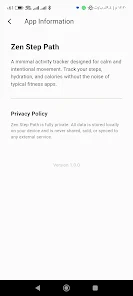
Because Zen Step Path operates offline and stores information locally, you maintain control of your data and avoid automatic sharing. Manual entry makes it easy to correct or adjust totals without relying on sensors, and the focused feature set keeps the app lightweight and simple to use. Visual feedback from the circular progress and hydration indicators clarifies progress toward daily targets, while contextual estimates add useful information without complicating the interface.
Manual entry is required, so there is no automatic step detection and you must enter step counts and water intake yourself. The app does not offer cloud backup or device syncing, which means you are responsible for local data management. Activity calculations are estimates derived from entered step totals rather than continuous sensor data, and feature scope is intentionally limited to steps, water and basic stats.
File size: 16.00 M Latest Version: 27.27.27
Requirements: Android Language: English
Votes: 158 Package ID: com.zen.step.path
Developer: Granicafe

Must Have Tools Apps for Android
Equip yourself with our all-in-one toolbox app for everyday tasks and projects. Instantly convert between units, calculate tips, scan documents, manage files, and more with handy productivity tools. Includes a level, compass, QR code reader, ruler, speedometer, decibel meter, and flashlight. Save frequently used tools to your customizable dashboard for one-tap access. Track billable hours, wages, budgets, and invoices. Annotate screenshots, magnify labels, and sign PDFs on the go.






LIVE A HERO
Retro Hero Mr Kim
Empire of Passion
Arcane Quest Legends
Magic Snap: Momotaro
AllStar Manga Heroes
Lunescape
ONE PIECE Thousand Storm JP
Tap Titans 2



































