Scan to Download
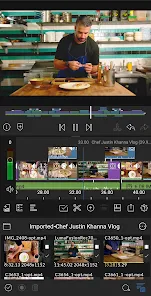
LumaFusion Pro is a professional-grade mobile video editing app that provides users with powerful tools and a user-friendly interface to create high-quality videos. Designed for both beginner and advanced editors, it offers a wide range of features including multi-track editing, customizable effects, and precise audio control. Whether you’re editing short films, YouTube videos, or social media content, LumaFusion Pro makes it easy to produce cinematic videos on the go. With its intuitive layout and robust editing capabilities, this app has become a go-to choice for mobile video creators.
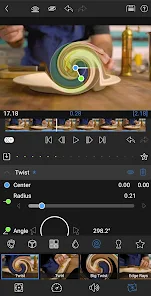
1. Multi-Track Editing: LumaFusion Pro supports up to six video and audio tracks, allowing you to layer clips, add sound effects, and create complex projects with ease.
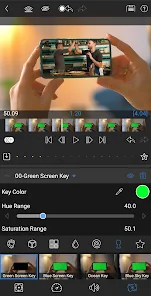
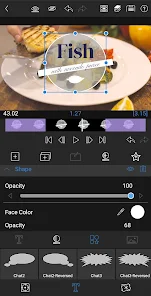
2. Advanced Effects and Transitions: The app offers a wide selection of customizable visual effects, transitions, and keyframing tools to give your videos a polished, professional look.
3. Precision Audio Control: With advanced audio editing features, you can adjust volume levels, apply equalization, and use multiple audio tracks for a rich sound experience.
4. High-Resolution Export: LumaFusion Pro supports exporting videos in various formats, including 4K resolution, allowing you to create stunning, high-quality content.
5. Intuitive Interface: Despite its powerful features, the app's interface remains user-friendly and easy to navigate, with touch gestures and drag-and-drop tools that streamline the editing process.
1. Organize Your Clips: Use folders and color-coded labels to organize your media, making it easier to access and arrange clips during the editing process.
2. Experiment with Multi-Track Editing: Take full advantage of multi-track editing to create layered videos with visuals, text, and sound effects. It adds depth and creativity to your projects.
3. Use Keyframes for Custom Animations: Add dynamic effects and transitions using keyframes to animate elements such as text, images, and video clips for a more professional finish.
4. Fine-Tune Audio: Use the audio editing tools to balance sound levels, apply noise reduction, and add voiceovers or sound effects to enrich your video's audio quality.
5. Maximize Export Settings: Before exporting, make sure to choose the best resolution and format for your project. Exporting in 4K ensures your videos maintain a high level of detail for professional-grade content.
LumaFusion Pro is an exceptional video editing app that combines advanced tools with an easy-to-use interface, making it perfect for both beginners and professionals. With features like multi-track editing, customizable effects, and precision audio control, it offers everything you need to create high-quality videos on your mobile device. Whether you're a content creator, filmmaker, or hobbyist, LumaFusion Pro gives you the tools to bring your creative vision to life. If you're looking for a powerful mobile video editor, LumaFusion Pro is a top choice that won’t disappoint.
File size: 55.10 M Latest Version: 1.0.68.4
Requirements: Android Language: English
Votes: 260 Package ID: com.luma_touch.lumafusion
Developer: LumaTouch
Top Free Video Editors Necessary Apps for Android
Unleash your inner filmmaker with our easy yet powerful mobile video editor! Trim, splice, and arrange clips with a simple drag-and-drop timeline. Easily apply stylish filters, text captions, transitions, visual effects, and audio tracks to customize your video. Built-in tools help stabilize shaky footage and adjust color and lighting. When your masterpiece is complete, export to popular formats and aspect ratios.






LIVE A HERO
Retro Hero Mr Kim
Empire of Passion
Arcane Quest Legends
Magic Snap: Momotaro
AllStar Manga Heroes
Lunescape
ONE PIECE Thousand Storm JP
Tap Titans 2