
Category: Productivity Date:2026-10-15 21:24:01
Rating: 4.3 Tags: Travel
Scan to Download
SHAREit Lite - Fast File Share is a compact Android tool that moves photos, videos, apps, and documents quickly without using mobile data. Designed for low-storage devices, it delivers high transfer speeds and a simplified interface so users can send and receive files across phones and PCs with minimal setup and battery drain.
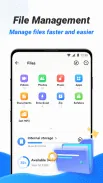
SHAREit Lite - Fast File Share focuses on the essentials of file transfer: lightning-fast local sharing, minimal permissions, and small app size. It supports cross-platform transfers between Android devices and Windows PCs, batch sending for multiple files, and resume capability for interrupted transfers. The app emphasizes security through direct device-to-device connections and offers basic file management tools so you can preview and organize content before sharing.
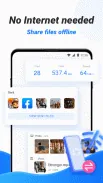
Transfers rely on Wi-Fi Direct technology to establish a direct connection between devices, so no mobile data is consumed and speeds are significantly higher than Bluetooth. To send files you create a connection from the sender device and scan a QR code or accept an invitation from the receiver. For PC transfers, the app can generate a local web address to open in a desktop browser, enabling drag-and-drop uploads and downloads without installing extra desktop software.
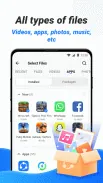
The interface is intentionally stripped back to reduce clutter and keep navigation straightforward. The main screen shows commonly shared categories—photos, videos, apps, and documents—so you can reach frequent items in two taps. SHAREit Lite - Fast File Share avoids complex menus; core actions are prominent and file previews are immediate. A progress indicator and simple transfer history help you track ongoing jobs and quickly repeat recent transfers.
Built for low-end and mid-range devices, SHAREit Lite - Fast File Share prioritizes memory efficiency and battery-friendly behavior. The APK footprint is small to save storage, and background activity is limited to maintain performance. Compatibility extends across a wide range of Android versions and device models; the app negotiates the fastest available local network protocol between devices so transfer rates adapt to hardware and signal conditions.
Whether you need to move large photo libraries, share apps with colleagues, or send documents to a nearby laptop, the app fits everyday scenarios. Teachers can distribute lesson files to students during class without internet; travelers can exchange media between phones quickly at airports; small teams can consolidate content on a single device for editing. SHAREit Lite - Fast File Share is particularly useful where data caps or slow mobile networks make cloud uploads impractical.
Installation is straightforward and the launcher guides you through the first transfer. Open SHAREit Lite - Fast File Share, choose the content category, select files, then tap Send or Receive to establish a peer connection. For PC transfers, follow the on-screen instructions to open the provided local URL. Regular updates focus on bug fixes and protocol improvements, keeping the experience reliable without bloating the app size.
File size: 61.50 M Latest Version: 3.7.79_ww
Requirements: Android Language: English
Votes: 357 Package ID: shareit.lite
Developer: Smart Media4U Technology Pte.Ltd.




Best Free Travel Apps for Your Android Phone
Make travel planning effortless with our all-in-one trip companion app! Get insider tips from locals on top attractions, hidden gems, restaurants, and accommodations at your destination. Book flights, rental cars, and hotels at the lowest prices. Access maps offline; track bookings, itineraries, and reservations; create shared group trips; and auto-translate menus, signs, and conversations abroad. Our clever algorithms surface personalized recommendations everywhere you go.






LIVE A HERO
Retro Hero Mr Kim
Empire of Passion
Arcane Quest Legends
Magic Snap: Momotaro
AllStar Manga Heroes
Lunescape
ONE PIECE Thousand Storm JP
Tap Titans 2










































