Scan to Download
Crosshair & Nickname Generator is a compact Android utility that helps gamers design personalized aiming reticles and craft memorable nicknames with minimal fuss. It combines a simple crosshair editor, nickname templates, and export options so players can test, save, and apply custom overlays or profile names quickly across shooters and streaming setups.
The app puts two practical utilities into one interface: a visual crosshair designer and a nickname creator. Players who want to fine-tune their HUD or refresh their online identity will appreciate the focused toolset. It’s lightweight, responsive, and aimed at users who prefer quick results over feature bloat.
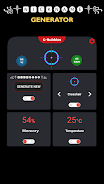
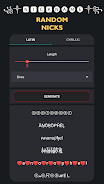
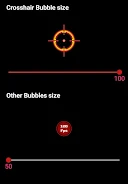
After opening Crosshair & Nickname Generator, you choose between the crosshair or nickname module. The crosshair screen shows live sliders for size, thickness, and gap; changes update immediately. For nicknames, a swipeable carousel presents suggestions based on theme, length, and special character options. Everything is presented with minimal menus so you can get to a usable result within seconds.
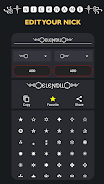
The crosshair toolkit focuses on iterative adjustments. You can lock a favorite design and load it as a baseline for variations. Naming tools let you seed the generator with keywords and then refine output by toggling capitalization, numeric substitutions, and decorative glyphs. That iterative flow suits players who experiment between matches or stream breaks.
Customization is the main appeal. For crosshairs, choose from dot, cross, circle, or hybrid shapes, and pair those with center indicators and outer markers. The color picker includes presets for common competitive palettes plus a custom hex entry. For nicknames, filters narrow results by tone—edgy, playful, or professional—and you can pin favorite results to a local list.
The interface emphasizes clarity. Controls are large enough for one-handed use and the preview area scales to different screen sizes. Resource usage is low; the app remains smooth on older mid-range phones and does not require background services. Load times are short and exports are handled locally, so no account creation is necessary.
Crosshair & Nickname Generator fills a niche for users who want immediate, tangible results without navigating complicated graphic tools or online name generators. It bridges the gap between aesthetic customization and functional practicality, enabling players to test reticles and names in real time and export them where they need them most.
Download and open the app, grant any prompted permissions for storage if you plan to save images, then choose a module to begin. Spend a few minutes with presets to learn how sliders and filters affect outcomes. Regular users will find the save-and-apply pattern makes it easy to iterate while keeping a small library of options for matches and streams.
Crosshair & Nickname Generator is an efficient, purpose-built utility for gamers who value customization that’s fast, tangible, and portable. With focused tools and a no-friction workflow, it’s a handy addition to any player’s mobile toolkit.
File size: 13.20 M Latest Version: 65
Requirements: Android Language: English
Votes: 112 Package ID: com.fpsmeter.crosshairfree

Must Have Tools Apps for Android
Equip yourself with our all-in-one toolbox app for everyday tasks and projects. Instantly convert between units, calculate tips, scan documents, manage files, and more with handy productivity tools. Includes a level, compass, QR code reader, ruler, speedometer, decibel meter, and flashlight. Save frequently used tools to your customizable dashboard for one-tap access. Track billable hours, wages, budgets, and invoices. Annotate screenshots, magnify labels, and sign PDFs on the go.






LIVE A HERO
Retro Hero Mr Kim
Empire of Passion
Arcane Quest Legends
Magic Snap: Momotaro
AllStar Manga Heroes
Lunescape
ONE PIECE Thousand Storm JP
Tap Titans 2