CASE Conf 2025 puts the conference program in your pocket so you can plan, navigate, and get the most from the event with confidence. This app collects schedules, session descriptions, exhibitor details, and the Trade Show floor map into a single interface that works on Android phones and tablets, helping attendees find relevant sessions, locate booths, and access on-site resources without paper programs or constant searching.
The schedule view shows all education sessions with times, room assignments, and speaker names so attendees can browse by day, track, or keyword. Each session page includes a summary, speaker bio, session level, and suggested audience, making it easier to decide which events match professional interests. A personal agenda tool lets you mark sessions to build a custom schedule; the app highlights conflicts and provides easy ways to remove or reorder saved items.
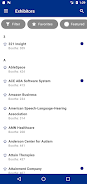
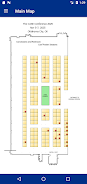
The interactive Trade Show exhibit hall floor map is optimized for touch. Zoom and pan controls let you orient yourself by aisle and booth number. Booth pages contain exhibitor descriptions and contact details supplied by organizers; you can bookmark exhibitors and view a list of favorites to plan on-floor visits. CASE Conf 2025 groups exhibitors by category so you can explore companies that match product or service needs.
Controls are simple and consistent across the app: tap to open details, double-tap or pinch to zoom hall maps, and use the search bar to locate sessions, speakers, or exhibitors quickly. Filters let you narrow session lists by track, topic, or format, and clear labels show room capacity or session level where provided. The interface prioritizes fast access to key information so navigating between session details, the map, and your saved agenda takes only a few taps.
Rather than game-like leveling, progression in CASE Conf 2025 happens through personalized planning: as you save sessions and exhibitors, the app adapts by surfacing related sessions and nearby booths you might have missed. You can add personal notes to session pages and attach reminders to items in your agenda. The visual theme and list density are adjustable so users can choose a compact view for dense days or a more spacious layout for easier reading.
The app uses a clean, readable visual design with clear typography and high-contrast elements for easy reading under bright trade show lighting. Session listings are grouped with subtle dividers and color accents to indicate tracks or session types. The map view highlights your saved exhibitors and current session rooms in a contrasting color to make navigation intuitive at a glance.
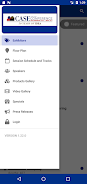
Information is organized by logical event sections: daily schedules, session tracks, Trade Show map, exhibitor directory, and on-site resources such as Wi-Fi details and venue logistics. Within sessions, content is further structured into overview, speaker information, and related materials. This hierarchical structure helps users move from broad browsing to detailed planning without losing context.
Beyond the conference dates, CASE Conf 2025 remains a useful reference for session notes, speaker contacts, and exhibitor information that attendees saved during the event. Exporting or reviewing your personal agenda and notes after the conference supports follow-up and continuing education, extending the app’s value past the live sessions.
The app includes accessibility considerations such as scalable text sizes and clear color contrast for readability. Core content is cached for offline access so users can view schedules and maps even in areas of limited connectivity on the show floor; organizer-supplied updates will synchronize when a connection is available. The design balances visual clarity with quick interactions to minimize friction while moving between sessions or walking the exhibit hall.
CASE Conf 2025 depends on accurate and timely content from conference organizers; session changes or last-minute room updates are possible and will appear in the app only after the organizers provide them. The tool is tailored to the 2025 event program, so functionality and content are optimized for this conference experience and may be less relevant after the event concludes. Where applicable, event resources and speaker materials are included only if provided by presenters or exhibitors.
By centralizing schedules, maps, exhibitor details, and on-site resources, CASE Conf 2025 reduces time spent searching for information and makes it easier to build a focused agenda. The app supports efficient navigation of the exhibit hall and discovery of sessions that match professional goals, while offline caching and accessibility options ensure consistent usability on busy event days.
File size: 28.14 M Latest Version: 1.24.0
Requirements: Android Language: English
Votes: 278 Package ID: a2z.Mobile.Event6564
Developer: A2Z Personify LLC


Top Events Free Apps for Android
Discover and share the hottest events around with our intuitive apps. Find local concerts, festivals, shows, and more based on your unique interests. Create customizable calendars of upcoming events to coordinate schedules with friends. Purchase tickets seamlessly from our integrated platforms. Check real-time transit schedules to plan your trip. Access maps, directions, and parking information for any venue.






LIVE A HERO
Retro Hero Mr Kim
Empire of Passion
Arcane Quest Legends
Magic Snap: Momotaro
AllStar Manga Heroes
Lunescape
ONE PIECE Thousand Storm JP
Tap Titans 2