
Scan to Download
TASCK is a streamlined task management app designed to simplify daily work and personal to-dos with clear lists, smart scheduling, and quick entry. It brings powerful organization tools into a clean interface so users can create, prioritize, and track tasks without clutter, improving focus and delivering measurable productivity gains.
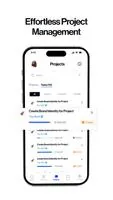
TASCK centers on straightforward yet powerful features that help you plan and execute tasks. At its core are task lists, deadlines, reminders, and a priority system that lets you flag items for immediate attention. Tasks can include notes, subtasks, and attachments, ensuring all relevant information stays connected to the action item.
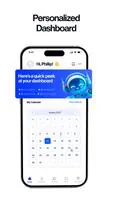
The interface is built for quick comprehension and minimal distraction. TASCK uses a hierarchy of lists, projects, and tags so users can shift between broad plans and specific tasks. A clean timeline view shows upcoming tasks and deadlines while a compact dashboard highlights today’s priorities, overdue items, and completed milestones.
Navigation is intentionally shallow: create a task in a single tap, assign it to a list, and set a reminder. The app supports swipe gestures for fast triage—snooze, complete, or reschedule—making it efficient during busy workdays.
For teams and power users, TASCK offers integrations that tie task lists into existing workflows. Sync with calendar apps so deadlines appear alongside meetings, or connect with email and chat platforms to convert messages into assignable tasks. Shared lists allow teammates to view progress, comment on tasks, and reassign responsibilities, keeping everyone aligned.
TASCK adapts to different planning styles through flexible organization options. Use tags to cross-reference related tasks, color-code lists to visually group workstreams, and apply filters to display only the most relevant items. Custom views let you switch between board-style kanban, list, or calendar perspectives to match how you think.
TASCK is designed to be lightweight and fast across a range of Android devices. Offline-first caching allows you to view and edit tasks without a network connection; changes sync automatically once online. The app emphasizes data integrity with encrypted backups and optional cloud sync so your lists remain safe and recoverable.
Battery and resource usage are optimized through background scheduling that minimizes wakeups while ensuring timely reminders. Regular updates address compatibility improvements and deliver new productivity enhancements based on user feedback.
Begin by creating a few primary lists—such as Work, Personal, and Errands—and add your most urgent tasks. Use priorities and due dates to build a manageable daily agenda, then try the quick add widget to capture tasks on the fly. Invite a collaborator to a single list to explore shared task management and discover how assignment and comments streamline teamwork.
TASCK fits individuals who want a focused task manager as well as small teams that need lightweight coordination tools. With its combination of simplicity, customization, and reliable performance, TASCK helps convert plans into action while keeping your workflow uncluttered and intentional.
File size: 27.63 M Latest Version: 1.01
Requirements: Android Language: English
Votes: 424 Package ID: com.tasck_mobile
Developer: TASCK




Must Have Home Apps for Android
Make your house a home with our suite of helpful home apps. Discover clever tools to organize closets, streamline chores, and simplify cooking. Take the stress out of cleaning and maintenance with handy checklists and schedules. Enhance security and control appliances and lighting with our smart home integrations. Design, visualize, and renovate like a pro using our 3D planning software.






LIVE A HERO
Retro Hero Mr Kim
Empire of Passion
Arcane Quest Legends
Magic Snap: Momotaro
AllStar Manga Heroes
Lunescape
ONE PIECE Thousand Storm JP
Tap Titans 2










































