
Scan to Download
Timetablr helps busy people organize schedules, tasks, and routines with a focused timetable builder that syncs across devices and simplifies daily planning. The app combines drag-and-drop scheduling, color-coded blocks, and smart reminders to turn chaotic calendars into clear, actionable plans for work, study, and life.
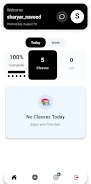
Timetablr is a productivity app designed for users who need a compact, visual way to manage time. It blends a traditional calendar view with modular timetable tiles so you can build repeating schedules, plan single days, or map out multi-week projects. The design emphasizes speed: create an entry, assign duration and tags, and position it on your timeline in seconds.
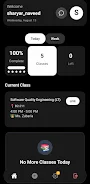
The interface groups tools logically to reduce friction. A left-hand panel holds categories and templates, the main canvas displays your timetable, and a top bar offers quick actions like sync and export. Timetablr supports keyboard shortcuts and gestures to speed up common tasks. For users who switch contexts often, the app keeps recent templates and a clipboard history to paste events between timetables.
Start by creating a timetable for a day, course, or week. Add activity blocks using the new entry button or double-tap on the canvas. Assign a title, duration, and optional tag. Use templates to quickly add recurring sequences—useful for class schedules or workout routines. Timetablr translates these entries into calendar events if you enable integration, so your main calendar remains consistent.
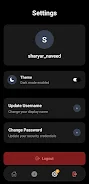
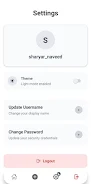
Timetablr offers multiple levels of personalization. Choose from compact or expanded tile sizes, switch between hourly and block views, and change the default notification behavior. Themes include light, dark, and high-contrast modes. Users can create custom templates for recurring workflows like study blocks, deep work sessions, or client meetings. Advanced users will appreciate the custom color palette and the ability to save filter sets for different contexts.
The app is optimized to handle dense schedules without lag. Rendering remains smooth when dozens of blocks populate a day. Animations are subtle and informative—dragging an item produces a guide that snaps to logical start times. The interface stays uncluttered by collapsing side menus and offering a focused mode that hides all but the timetable itself.
Sharing is straightforward: export a timetable as a URL or invite collaborators to edit. Timetablr supports permissions so you can share a read-only schedule with students or grant editing rights to teammates. Notifications are adjustable per user to avoid spamming participants. The app also logs changes so you can review edits made by collaborators.
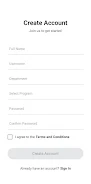
Begin by importing an existing calendar or building a simple day from scratch. Explore templates to see how recurring schedules behave, then customize one to match your routine. Timetablr’s onboarding guides you through creating your first timetable and setting up reminders. If you work with others, test the sharing features by inviting a colleague to view a single schedule.
Timetablr balances precision and flexibility, giving users quick control over daily structure while supporting deeper planning for projects, courses, and teams. The app suits students, freelancers, and managers who prefer a visual approach to time management without sacrificing integrations and collaboration tools.
File size: 93.72 M Latest Version: 1.0.0
Requirements: Android Language: English
Votes: 212 Package ID: com.sharyar_naveed.timetablr
Developer: timetablr

Best Free Travel Apps for Your Android Phone
Make travel planning effortless with our all-in-one trip companion app! Get insider tips from locals on top attractions, hidden gems, restaurants, and accommodations at your destination. Book flights, rental cars, and hotels at the lowest prices. Access maps offline; track bookings, itineraries, and reservations; create shared group trips; and auto-translate menus, signs, and conversations abroad. Our clever algorithms surface personalized recommendations everywhere you go.






LIVE A HERO
Retro Hero Mr Kim
Empire of Passion
Arcane Quest Legends
Magic Snap: Momotaro
AllStar Manga Heroes
Lunescape
ONE PIECE Thousand Storm JP
Tap Titans 2










































