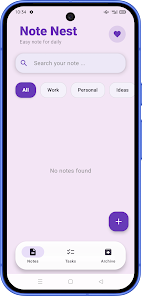
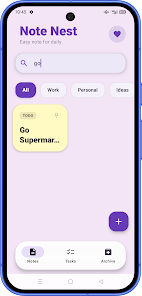
Note Nest is a focused note-taking app that helps you gather daily notes, ideas, and simple task lists in a single, tidy workspace. Use it to jot down personal thoughts, work plans, reminders, or quick to-dos and keep everything organized with clear categories and a calm, colorful layout. Note Nest makes it easy to find what you need with a built-in search, supports checklist-style task items inside notes, and lets you pin, archive, or protect selected entries — a straightforward tool for everyday organization and quick capture.
⭐ Create notes for daily planning, ideas, quick reminders and simple to-do items.
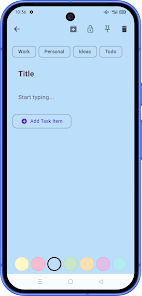
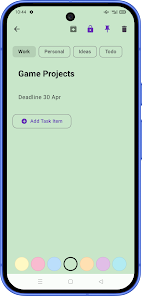
⭐ Organize content by clear categories such as Work, Personal, Ideas and Todo for faster access.
⭐ Search notes quickly when you need to recover an idea or task.
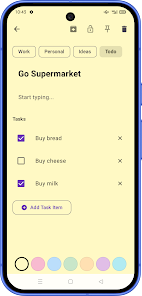
⭐ Add checklist-style task items inside notes for simple planning and tracking.
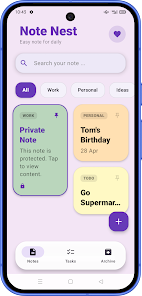
⭐ Pin important notes to keep them at the top and archive items you want to retain without cluttering the main view.
⭐ Protect selected notes for privacy and enjoy colorful note cards that make lists easier to scan with Note Nest.
✅ Keeps notes, reminders and light task lists together in one clean interface so you spend less time switching apps.
✅ Visual, colorful cards improve scanability and help you spot important items faster.
✅ Pinning and archiving options make it simple to control what appears in your main view and what you keep for later.
✅ Built-in search speeds up retrieval of ideas or tasks when you need them most.
✅ Optional protection for selected entries helps safeguard private content without complicating everyday use.
❎ Designed for simple note-taking and light task management, so it may not include advanced project management features.
❎ There is no indication of collaboration tools for team use, which limits its use for shared project workflows.
File size: 49.00 M Latest Version: 1.0
Requirements: Android Language: English
Votes: 446 Package ID: com.pavilonedung.notenest
Developer: Dungkalios

Must Have Tools Apps for Android
Equip yourself with our all-in-one toolbox app for everyday tasks and projects. Instantly convert between units, calculate tips, scan documents, manage files, and more with handy productivity tools. Includes a level, compass, QR code reader, ruler, speedometer, decibel meter, and flashlight. Save frequently used tools to your customizable dashboard for one-tap access. Track billable hours, wages, budgets, and invoices. Annotate screenshots, magnify labels, and sign PDFs on the go.






LIVE A HERO
Retro Hero Mr Kim
Empire of Passion
Arcane Quest Legends
Magic Snap: Momotaro
AllStar Manga Heroes
Lunescape
ONE PIECE Thousand Storm JP
Tap Titans 2