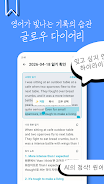
Glow Diary is a modern personal journaling app that helps you capture daily thoughts, photos, and moods with ease. It combines simple entry creation, flexible organization, and privacy controls so you can keep a secure, searchable record of life events, habits, and creative ideas on your Android device.
Glow Diary focuses on practical tools that make journaling fast and reliable. Create text entries with rich formatting, attach photos or voice notes, and tag items for quick retrieval. The app includes calendar and timeline views to navigate entries by date, alongside a powerful search function that filters by tag, keyword, or mood. Regular reminders and optional daily prompts help build a consistent writing habit.
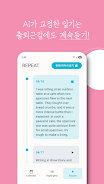
The interface prioritizes clarity and speed: a clean home screen shows recent entries and a prominent new-entry button makes capture immediate. A single-tap entry composer supports title, body, and media attachments, while templates let you save structured layouts for gratitude lists, travel logs, or project notes. Navigation is intuitive with swipable entry previews, a compact side menu for archives and settings, and quick filters for starred or pinned posts.
Glow Diary offers several ways to tailor your journal to personal taste. Choose from multiple color themes, font sizes, and layout options to create a comfortable reading and writing environment. You can define mood icons, create custom tags, and set recurring prompts. Widgets provide at-a-glance access to a quick-entry field or today’s highlight directly from your home screen.
Protecting personal writing is central to Glow Diary. The app supports passcode and biometric locks so entries remain private on-device. Users can enable local encryption and set automatic backups to secure cloud services if they prefer syncing across devices. Export options include PDF and plain-text backups, giving you independent control over your data and an easy way to migrate or archive entries.
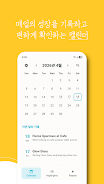
Beyond plain text, Glow Diary handles photos, audio clips, and simple sketches. Attach images to entries or create dedicated photo journals. Audio recording is useful for capturing thoughts when typing isn’t convenient. Entries can be organized into collections or topics, and bulk actions let you move or delete multiple items at once. The built-in calendar highlights days with entries, making it simple to spot streaks or gaps over weeks and months.
Designed for mobile use, the app is lightweight and responsive on a wide range of Android devices. It minimizes battery drain by suspending background tasks and compresses media for efficient storage. Syncing is incremental to avoid large data transfers, and offline mode ensures you can write without a network connection. The app aims to remain compatible with commonly used Android releases and scales gracefully across phones and tablets.
Glow Diary supports basic integrations to streamline your workflow. You can share entries to other apps, save selected notes to cloud storage, or export collections as PDFs for printing or long-term archiving. The structured export tools are helpful for users who want to create backups, compile travel stories, or hand off content to other platforms without losing formatting.
Begin by creating a profile and setting a passcode for immediate privacy. Add a few entries to test templates and media attachments, then enable reminders to cultivate a habit. Use tags and the calendar view to organize early content so navigation feels familiar as your archive grows. Periodically export a backup to preserve your journal outside the app.
Glow Diary blends a focused writing experience with practical organization and privacy options, making it suitable for daily reflection, creative projects, and life tracking. With simple tools for capturing moments and robust settings for protection and export, the app helps keep your personal stories accessible and secure.
File size: 14.00 M Latest Version: 1.0
Requirements: Android Language: English
Votes: 447 Package ID: com.asasyl.glowdiary
Developer: Asasyl




Must Have Home Apps for Android
Make your house a home with our suite of helpful home apps. Discover clever tools to organize closets, streamline chores, and simplify cooking. Take the stress out of cleaning and maintenance with handy checklists and schedules. Enhance security and control appliances and lighting with our smart home integrations. Design, visualize, and renovate like a pro using our 3D planning software.






LIVE A HERO
Retro Hero Mr Kim
Empire of Passion
Arcane Quest Legends
Magic Snap: Momotaro
AllStar Manga Heroes
Lunescape
ONE PIECE Thousand Storm JP
Tap Titans 2











































