
Scan to Download
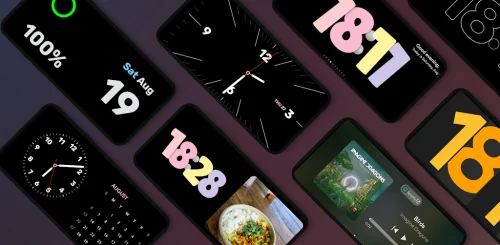
StandBy Mode Pro is a compact utility that helps you manage device idle behavior, conserve battery life, and tailor background processes. It gives granular control over sleep states, network access, and app wakelocks while offering easy automation, real-time stats, and a clean interface for power-conscious users.
StandBy Mode Pro is designed for users who want fine-grained control over how their Android device behaves when it’s not in active use. Instead of leaving everything to the system’s default power management, this app lets you define rules that pause, throttle, or allow specific services and apps during standby periods. The goal is predictable battery savings without breaking important background tasks.
The app sits as a lightweight service and monitors system events such as screen off, charging state, and connectivity changes. When a configured condition is met, StandBy Mode Pro applies the chosen profile: disabling background sync for selected apps, suspending periodic tasks, or putting radios into reduced activity mode. Changes are applied without requiring a reboot and revert when the device exits standby. This makes the behavior reversible and safe for everyday use.
The interface aims for clarity: dashboards surface key metrics like active policies, recent wake events, and estimated savings. Settings pages group network, CPU, and app controls so you can find relevant options quickly. Because the app’s operations are event-driven, overhead is minimal. Memory footprint remains low and the automation routines are optimized to avoid excessive CPU checks.
Real-time logs help diagnose why an app was allowed or blocked. If a critical notification is missed, users can review recent events to fine-tune exceptions. Graphs show trends in wakeups and estimated battery saved, helping you validate the effect of each profile.
For commuters who want to stay reachable but preserve battery, a hybrid profile allows messaging apps while throttling social media. For overnight use, a strict night profile can mute network activity and suspend nonessential processes until morning. Travelers benefit from a power-saving profile that reduces roaming data usage and lowers radio activity.
Power users will appreciate cron-style scheduling and location-aware triggers. Integration with Android’s Doze and battery optimization features prevents conflicting behaviors. For those who want full automation, conditional chains can apply different levels of restriction depending on battery percentage and time of day.
Many users find that StandBy Mode Pro delivers reliable battery improvements without the hassle of manual tweaks. The balance of automation and fine control is useful for both casual and advanced users. Positive feedback often cites improved device uptime and clear, actionable reporting.
Installation is straightforward: grant the necessary permissions and follow the setup wizard to create your first profile. The wizard suggests safe defaults and highlights critical exceptions so you won’t miss important alerts. From there, experiment with one profile at a time and use the logging view to confirm expected behavior.
Keep the app updated to receive compatibility fixes for new Android releases. Periodically review profiles and exceptions as you install new apps or change usage patterns. With modest configuration, StandBy Mode Pro becomes a helpful tool to stretch battery life while maintaining the utility of your device.
File size: 13.11 M Latest Version: 1.4.292
Requirements: Android Language: English
Votes: 111 Package ID: br.com.zetabit.ios_standby



Must Have Home Apps for Android
Make your house a home with our suite of helpful home apps. Discover clever tools to organize closets, streamline chores, and simplify cooking. Take the stress out of cleaning and maintenance with handy checklists and schedules. Enhance security and control appliances and lighting with our smart home integrations. Design, visualize, and renovate like a pro using our 3D planning software.






LIVE A HERO
Retro Hero Mr Kim
Empire of Passion
Arcane Quest Legends
Magic Snap: Momotaro
AllStar Manga Heroes
Lunescape
ONE PIECE Thousand Storm JP
Tap Titans 2










































