GetUP Alarm is a practical alarm solution that pairs a phone app with a small physical checkpoint device to force movement out of bed when an alarm sounds. GetUP Alarm replaces the familiar snooze workflow by requiring a deliberate action — walking to the checkpoint and tapping your phone — so that mornings become more predictable for people who habitually oversleep. The description below explains how the system works, what you can control from the app, and realistic expectations for everyday use.
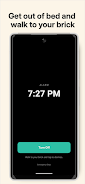
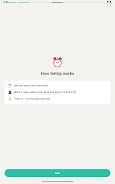
The system uses a dedicated checkpoint device that you place away from your bed. When an alarm triggers, the app will ring until you walk to that checkpoint and tap your phone on the device to silence it. Because silencing is only possible at the brick, the only reliable way to stop the alarm is to get out of bed and physically move, which interrupts the common bed-to-scroll routine. The app handles alarm scheduling, maintains the pairing information for the checkpoint, and enforces the rule that the alarm cannot be dismissed from the bedside — the brick acts as the physical confirmation of wakefulness.
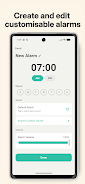
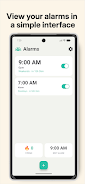
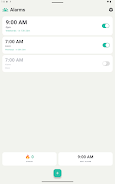
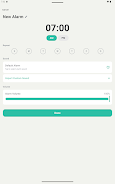
The GetUP Alarm app gives you a straightforward interface for creating and managing multiple alarms: set exact times, choose repeat schedules for weekdays or custom day combinations, and pick different alarm sounds for different routines. You can label alarms to remind yourself of morning tasks, set volume and vibration preferences for the phone, and assign which paired checkpoint should silence which alarm if you use more than one physical device in the home. The app emphasizes clear, easy-to-tap controls so that setting or editing alarms is quick, both at initial setup and when your schedule changes.
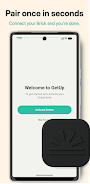
The design of GetUP Alarm focuses on simplicity and reliability rather than flashy visuals. On-screen instructions guide you through pairing the checkpoint and placing it at the optimal distance from your bed. The app respects standard Android accessibility settings, including system font size adjustments and screen reader compatibility, making the setup and alarm interactions approachable for a wide range of users. For those who prefer less abrupt awakenings, the choice of alarm tones and vibration helps soften the experience, although the enforced movement is still the core mechanism for preventing snoozes.
Using a physical checkpoint introduces a few practical trade-offs. The brick must be placed somewhere you can consistently reach without returning to bed, so small bedrooms or shared spaces may limit placement options. Because the silencing action happens on the checkpoint rather than on the bedside device, the approach is less convenient if you frequently change sleeping locations. Also, the enforced wake-up can feel abrupt to users who prefer gradual, incremental alarm volumes; the app mitigates this by letting you choose tones and vibration patterns, but the behavioral friction is intentional and central to its purpose.
GetUP Alarm is designed to work locally: pairing and alarm schedules are stored on your phone and the communication with the checkpoint is handled directly, meaning basic operation does not require an online connection. That local-first approach reduces dependency on cloud services and keeps your alarm settings private. Because the system enforces physical confirmation at the checkpoint, it does not rely on network latency or external servers to function reliably.
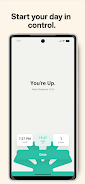
The main objective of GetUP Alarm is to change the morning routine by introducing a single, repeatable rule: get up and tap the brick. That small behavior adds deliberate movement to the start of the day, which reduces immediate phone use and quick returns to sleep. Over time, the consistent breakpoint between bed and active morning helps form a new habit — being up and starting tasks on schedule — without adding complicated configurations. For people who struggle with repeated snoozes or morning phone distraction, the combined app-and-device approach offers a pragmatic, low-tech nudge that produces more reliable wake-ups and a calmer start to the day.
File size: 14.00 M Latest Version: 1.2
Requirements: Android Language: English
Votes: 413 Package ID: com.harrison.getupalarm
Developer: GetUP Alarm



Must Have Home Apps for Android
Make your house a home with our suite of helpful home apps. Discover clever tools to organize closets, streamline chores, and simplify cooking. Take the stress out of cleaning and maintenance with handy checklists and schedules. Enhance security and control appliances and lighting with our smart home integrations. Design, visualize, and renovate like a pro using our 3D planning software.






LIVE A HERO
Retro Hero Mr Kim
Empire of Passion
Arcane Quest Legends
Magic Snap: Momotaro
AllStar Manga Heroes
Lunescape
ONE PIECE Thousand Storm JP
Tap Titans 2