Scan to Download
MyWarung is a lightweight catalog app designed to help small store owners, street vendors and home-based businesses create and manage a clear digital product list without technical complexity. MyWarung puts product names, prices, categories and photos into a simple visual format that is easy to show to customers or share with staff, replacing paper lists and reducing the time spent on manual updates.
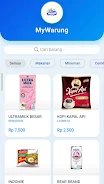
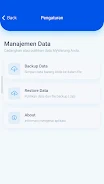
The core of the app is straightforward: add, edit or remove products with a few taps. Each entry stores a name, a price, a category and an attached photo from your phone gallery so menus and listings look professional and visual. A built-in search bar helps you find items quickly and preset category filters (Food, Drinks, Snacks, Others) let you narrow results instantly. The app also supports a pull-to-refresh gesture to update the visible list, and a single-tap export/import workflow that produces a backup (.zip) file to move your catalog between devices or keep a local copy.
Navigation emphasizes direct touch controls common on Android phones: a visible add button opens the product form, tapping an item opens its details for quick editing, and simple on-screen prompts guide you through adding photos and prices. The search field and category tabs are placed for one-handed use on most screen sizes. These familiar controls reduce learning time for users who are not comfortable with complex menus or settings.
MyWarung supports a natural progression as your business develops: start with a handful of items and gradually build a richer catalog by adding photos and descriptive names. Over weeks and months you can refine prices, reorganize by category and maintain seasonal variations by editing existing entries rather than recreating them. The app’s file-based backup lets you archive older versions of a menu or restore a catalog on a different device, which is useful when expanding or replacing hardware.
The interface uses a clean, uncluttered visual design with readable fonts and clear photo thumbnails so customers and staff can scan listings quickly. Customization focuses on presentation: attaching a good photo and choosing clear names improves how items appear when you show the catalog. Note that category options are limited to built-in selections (Food, Drinks, Snacks, Others), so while presentation is flexible, category structure is intentionally simple to keep the app lightweight.
MyWarung stores catalog data locally and does not require constant internet access for daily use, so vendors can operate in markets or locations with limited connectivity. When you want to move data or keep a copy, the backup/export creates a portable .zip file that you control. Because backups are file-based rather than synced to a cloud service, you manage where those files are stored and how they are transferred between devices.
Designed for users unfamiliar with technology, the app emphasizes large touch targets, clear labels and minimal steps for common tasks. Repeated use is built into the day-to-day workflow: updating prices, swapping photos, and showing the catalog to customers are quick operations that make the app useful every shift. That frequent engagement gives the app strong everyday value for small vendors who need a reliable, low-friction digital menu.
MyWarung focuses on creating and maintaining a product catalog rather than providing a full point-of-sale, billing, stock counting, or automatic cloud sync solution. Backup relies on manual file export and import, and category filters are intentionally simple, so businesses that need advanced inventory tracking or integrated online services should consider complementary tools. For vendors seeking a straightforward, visual product list that is easy to learn and operate, MyWarung offers a practical, low-complexity solution.
File size: 14.54 M Latest Version: 1.3.2
Requirements: Android Language: English
Votes: 457 Package ID: com.mywarung.app
Developer: FivGo


Must Have Home Apps for Android
Make your house a home with our suite of helpful home apps. Discover clever tools to organize closets, streamline chores, and simplify cooking. Take the stress out of cleaning and maintenance with handy checklists and schedules. Enhance security and control appliances and lighting with our smart home integrations. Design, visualize, and renovate like a pro using our 3D planning software.






LIVE A HERO
Retro Hero Mr Kim
Empire of Passion
Arcane Quest Legends
Magic Snap: Momotaro
AllStar Manga Heroes
Lunescape
ONE PIECE Thousand Storm JP
Tap Titans 2