Scan to Download
Cleaner Mate is a lightweight Android utility designed to help you reclaim storage and keep your device running smoothly. Cleaner Mate focuses on essential maintenance tasks: targeted junk-file cleaning, large-file detection with one-tap removal, intelligent photo compression and a compact battery information view that together simplify storage management for everyday users.
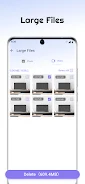
The app scans your phone for temporary files, cache fragments and residual installation data, grouping results into clear categories so you can review what will be removed before taking action. A large-file detector highlights oversized videos, downloads and documents so you can choose files to delete or move. Photo compression reduces image file sizes while aiming to preserve visible quality, letting you free substantial space without manually editing pictures. The battery information section provides basic usage details that help you identify apps or patterns that consume power. Across these areas Cleaner Mate keeps prompts and explanations simple, so maintenance is straightforward even for users who do not want technical detail.
Cleaner Mate follows a manual, step-based workflow: initiate a scan, review categorized results and confirm deletion with a single tap. Scans are optimized to list items quickly while giving you a preview of what will be removed, and controls are intentionally minimal so actions are easy to reverse or skip. When compressing photos you can choose an image or batch-select albums, preview the expected quality level and then apply compression to reclaim space. The app relies on local file access and standard Android permissions to perform tasks, so you retain control over which folders and file types are included in each operation.
Instead of game-like progression, Cleaner Mate offers a practical usage progression: regular maintenance sessions yield measurable improvements in available storage and clearer photo libraries. Each cleaning session summarizes the amount of space freed and highlights the largest items removed, helping you form a habit of periodic cleanups. The app’s straightforward feedback encourages repeat use because the benefits are visible and immediate, and repeated sessions gradually reduce clutter that otherwise accumulates over weeks and months.
The interface emphasizes clarity: labeled buttons, an uncluttered scan-results view and clear status indicators make it easy to understand current storage state at a glance. Large touch targets and a predictable navigation pattern reduce accidental taps, and typography is chosen for legibility on small screens. The visual approach is intentionally neutral and functional so users can focus on tasks rather than decorative elements.
Controls are centered on manual selection and confirmation to avoid unintended deletions. You can selectively uncheck files or entire categories before confirming a cleanup, and the preview step helps you verify that important items will be retained. Cleaner Mate does not perform background aggressive deletions or automatic scheduling by default, which aligns with a conservative approach to file management and gives users the final say on what stays or goes.
The core cleaning operations are performed locally on the device so Cleaner Mate does not require a persistent internet connection to do its main job. This keeps processing fast on modern devices and minimizes network usage. The app requests only the permissions necessary to access storage and battery stats and is designed to work with typical Android permission controls, allowing you to limit access to specific folders or media types if you prefer.
Cleaner Mate is focused on storage maintenance and basic battery reporting rather than on-device security or advanced performance tuning. It is not a full security suite, nor does it replace specialized performance optimizers that monitor CPU or thermal behavior in detail. The app also does not currently advertise automated scheduling or detailed app management beyond file-level cleanup, so some maintenance tasks are intentionally manual to avoid risky automated deletions.
For users who want a simple, local tool to clear cached clutter, identify and remove large files, compress photo libraries and quickly check battery usage, Cleaner Mate offers a restrained and practical solution. Install the app to scan your device, review results and take control of your storage without complicated settings or background services.
File size: 23.20 M Latest Version: 1.1.5
Requirements: Android Language: English
Votes: 241 Package ID: com.mycleaner.easyuse
Developer: 陕西晴宇悦网络科技有限公司





Best Free Media Apps for Your Android Phone
Explore an immersive world of entertainment with our media software. Watch, listen, and engage with your favorite shows, music, movies, and more. Access exclusive content, personalized recommendations, and innovative formats. Enhance your experience with our suite of cutting-edge applications. Discover hidden gems tailored to your unique tastes. Create, share, and connect over personalized playlists, reviews, and forums.






LIVE A HERO
Retro Hero Mr Kim
Empire of Passion
Arcane Quest Legends
Magic Snap: Momotaro
AllStar Manga Heroes
Lunescape
ONE PIECE Thousand Storm JP
Tap Titans 2