Scan to Download
Chess King is a chess training app that turns study into practical gameplay for players at every level, from absolute beginners to advanced competitors, and the app focuses on guided practice, interactive theory and measurable progress. This editor review highlights how Chess King combines structured courses in tactics, openings, middlegame, endgame and strategy with coach-like challenges and bite-sized exercises so you can improve calculation skills, learn common combinations and apply ideas in real positions. The interface is designed for both phones and larger tablet screens, with offline access that keeps lessons available when you are away from an internet connection.
The learning experience is built around hands-on exercises rather than passive reading: lessons require you to enter key moves and the engine checks answers, so training mirrors over-the-board decision-making. Exercises range from short tactical puzzles to multi-move strategic problems and endgame technique drills. Any training position can be resumed as a playable scenario against the built-in engine so you can test ideas in a full game context. The mechanics emphasize move-by-move understanding, repetition of typical patterns and gradual increase in complexity as you progress through levels.
Controls are intentionally simple and touch-friendly: drag-and-drop piece movement and optional tap-to-move let you choose the input style that fits your device and habits. The app offers undo options during practice, a move list for review, and the ability to step through example lines one move at a time. Hints are integrated into the control flow so you can request a nudge when stuck and receive a clear explanation of the idea behind the suggested move. On tablets the board scales to take advantage of the larger screen while preserving intuitive touch controls.
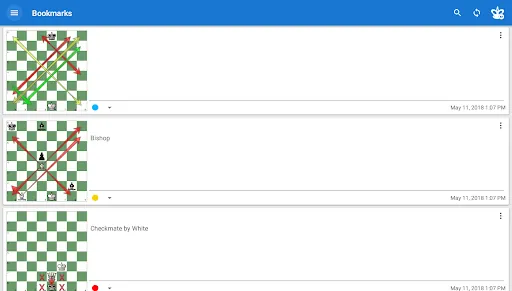
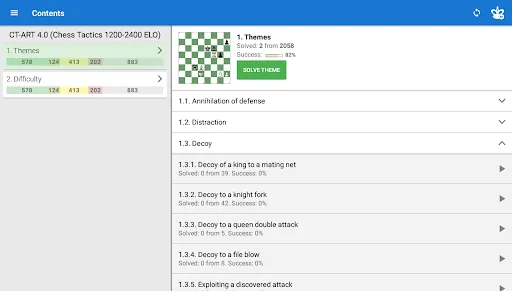
Lessons are grouped into structured courses that cover tactics, openings, middlegame planning and endgame fundamentals, each divided into progressive levels from beginner to professional. A built-in rating (ELO-style) tracks how you perform over time, reflecting improvements in calculation and accuracy. The course flow lets you repeat modules, bookmark important tasks for targeted review and resume interrupted lessons. Difficulty adapts to your results so subsequent problems match your current skill and keep training challenging but manageable.
The visual style aims for clarity: high-contrast boards, distinct piece silhouettes and optional coordinate notation help reduce visual clutter and improve focus. Customization options let you switch piece sets, change board colors, enlarge pieces for accessibility, and toggle move highlighting. These settings make it easier to tailor the visual presentation for better concentration or for users with visual preferences, while maintaining a consistent look that supports study rather than distracts from it.
Replay value comes from a large number of realistic example positions, the ability to bookmark favorite tasks and the option to play any exercise out against the engine. Because lessons are based on realistic game ideas, repeated practice helps internalize patterns that appear in real play. The combination of drills, tests and playable positions encourages players to return regularly and to apply learned concepts in actual games outside the app.
The app emphasizes clear explanations and step-by-step theory so users who prefer active learning can see why moves work. Accessibility features include adjustable board size, readable fonts for annotations, and color themes to aid users with different visual needs. The help system explains how rating, hints and lesson progression operate, making the learning curve transparent for newcomers.
One practical advantage is robust offline capability: lessons and exercises that you download remain playable without a network connection, which is useful for travel or limited connectivity. When you return online, progress syncing across devices keeps your training history consistent across phones and tablets tied to your account. This makes it easy to switch devices without losing lesson state or bookmarked tasks.
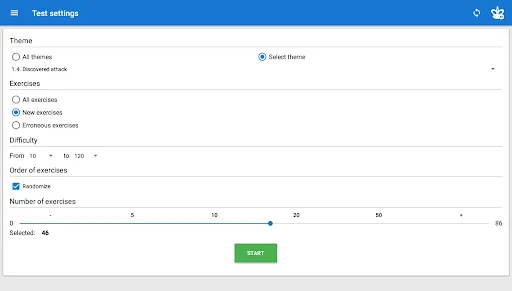
The coach-like system assigns practical problems, offers tiered hints, explains mistakes and shows typical refutations for wrong moves, so each error becomes a focused learning moment. Test modes simulate timed problem-solving and the app records performance trends so you can spot weak areas. While some course content is paid, most courses include free trial sections so you can evaluate the teaching approach before committing to a full course.
No training app replaces over-the-board experience, and Chess King can be demanding for users who prefer passive study because many lessons require active move entry. Some advanced modules are gated behind paid lessons, so be prepared to use free sections for sampling before expanding into the full curriculum. Overall, the app offers a practical, interactive path to improving chess understanding and calculation skills across a wide range of levels.
File size: 33.80 M Latest Version: 3.2.0
Requirements: Android Language: English
Votes: 411 Package ID: com.chessking.android.learn
Developer: Chess King

Must Have Puzzle Games for Android
Are you searching for an enjoyable method to strengthen your intellect? Our hottest logical puzzle is tailor-made to offer a stress-free pastime experience. With beautiful graphics and chill background music, you can immerse yourself in an engaging world of logic and critical thinking. Solve increasingly tricky levels at your own pace, with no time pressure or lives system.






LIVE A HERO
Retro Hero Mr Kim
Empire of Passion
Arcane Quest Legends
Magic Snap: Momotaro
AllStar Manga Heroes
Lunescape
ONE PIECE Thousand Storm JP
Tap Titans 2