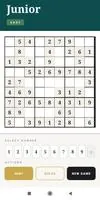
Sudoku Junior is a kid-friendly Sudoku app designed to turn the classic 9×9 number puzzle into a simple, colorful learning experience for children and families. Sudoku Junior places large, easy-to-tap cells and a clear number palette at the center of the interface so young players can focus on logical thinking rather than fiddly controls; the game guides beginners through bite-sized puzzles while still offering harder grids for older children and adults looking for a relaxed challenge.
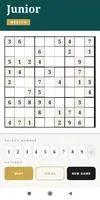
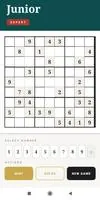
The app provides three difficulty settings — Easy, Medium and Expert — that control puzzle density and the number of starting clues so learners can progress at a comfortable pace. A built-in hint system gives gentle nudges when a child gets stuck, explaining a single safe move without revealing the entire solution, and a Solve option is available for parents or teachers who want to demonstrate strategies or finish a grid together. Audio cues, vibration feedback and celebratory confetti animations reward completed puzzles and reinforce a positive learning loop. Sudoku Junior generates a very large pool of unique puzzles so sessions remain fresh, and the layout scales to work well on both phones and tablets.
Gameplay centers on the classic rule set: fill each row, column and 3×3 box with the numbers 1 through 9 with no repeats. Controls are deliberately simple: tap a cell to select it, then tap a number in the on-screen palette to enter it. An erase or clear option removes mistakes quickly and the hint and solve buttons are placed within easy reach so children and caregivers can access help without interrupting the flow. The interface avoids clutter — large buttons, clear typography and consistent feedback reduce accidental inputs and make the app approachable for younger hands and learners with limited fine motor control.
Sudoku Junior is built around gradual skill building rather than time pressure. Early puzzles emphasize basic placements and pattern recognition, while Medium and Expert boards introduce fewer starting clues and more opportunities for deduction. The game encourages repeated practice: completing puzzles builds confidence and the hint system can be used as a teaching aid to show why a particular number belongs in a cell. Because difficulty is adjustable, parents and educators can tailor sessions for individual learners, stepping up the challenge as skills improve.
The visual design favors high contrast, bright colors and large targets to keep distractions minimal and improve readability for young eyes. Sound and vibration settings are optional and can be toggled off in quiet environments; celebratory animations can also be disabled if preferred. Sudoku Junior places an emphasis on accessibility through simple navigation, readable numerals and a clean grid layout so users with varying abilities can enjoy the puzzles. While the presentation is intentionally uncluttered and educational, small customization options — such as toggling feedback and adjusting sound levels — let families create the best environment for focused practice.
Because puzzles are generated locally, the app works without an internet connection, making it suitable for short trips, classroom use and device-restricted settings. Millions of unique puzzles and three difficulty tiers deliver significant replay value: learners can return to the app repeatedly to reinforce logic skills without seeing the same grids too often. The combination of short puzzle lengths and an approachable interface makes Sudoku Junior a convenient option for brief learning sessions at home or on the go.
Advantages include a distraction-free experience with large, easy-to-tap cells, clear progression that supports learners from basic to more advanced reasoning, and helpful learning tools like hints and a solve option for guided instruction. The app’s offline capability and large puzzle pool support long-term practice. Known limitations are intentional design choices: Sudoku Junior focuses exclusively on classic Sudoku puzzles and does not include additional mini-games, character-driven storylines or multiplayer modes. This keeps the experience educational and focused but means players seeking variety outside standard Sudoku rules will need a different title.
Sudoku Junior is therefore a practical, low-friction tool for introducing logical thinking and concentration through a familiar number puzzle format, with options for caregivers to assist, demonstrate techniques, or simply enjoy problem solving alongside younger learners.
File size: 31.31 M Latest Version: 1.3
Requirements: Android Language: English
Votes: 459 Package ID: com.satya.sudokujunior
Developer: VishKar






Must Have Puzzle Games for Android
Are you searching for an enjoyable method to strengthen your intellect? Our hottest logical puzzle is tailor-made to offer a stress-free pastime experience. With beautiful graphics and chill background music, you can immerse yourself in an engaging world of logic and critical thinking. Solve increasingly tricky levels at your own pace, with no time pressure or lives system.






LIVE A HERO
Retro Hero Mr Kim
Empire of Passion
Arcane Quest Legends
Magic Snap: Momotaro
AllStar Manga Heroes
Lunescape
ONE PIECE Thousand Storm JP
Tap Titans 2