Scan to Download
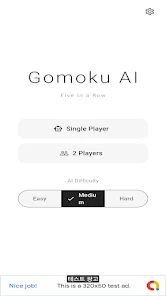
Gomoku AI: Offline Board Game delivers a polished single-player take on the classic five-in-a-row strategy game, offering configurable AI opponents, offline play, and clean board visuals for focused matches. Ideal for quick sessions or extended practice, it balances accessibility with challenging computer opponents across skill levels.
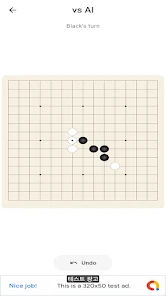
Gomoku AI: Offline Board Game provides a compact package that emphasizes gameplay depth over bells and whistles. The app includes multiple difficulty settings, a responsive touch interface, and a history feature so players can review moves. Because it runs entirely offline, it’s perfect for on-the-go practice without network dependency.
The AI evaluates board patterns, prioritizing both immediate wins and long-term threats. At lower difficulties it favors straightforward responses, while higher settings calculate several moves ahead and weigh blocking versus building sequences. Move selection combines heuristics and search depth to emulate humanlike decision-making without long wait times.
Gomoku centers on connecting five stones in a row while preventing your opponent from doing the same. Effective play in Gomoku AI: Offline Board Game involves recognizing common formations, creating multiple simultaneous threats, and learning when to trade space for tempo. Opening choices set the tone—early initiative can force defensive reactions from the AI, while careful blocking reduces the risk of sudden loss.
Tap and drag interactions make placing stones intuitive on phones and tablets. The interface highlights legal placement and shows suggested lines during training sessions. Menus are arranged for quick access to difficulty, board size, and undo functions so players spend more time thinking and less time navigating screens.
Designed to run smoothly on a wide range of devices, Gomoku AI minimizes CPU usage while maintaining responsive AI turns. The offline design reduces background data consumption and battery drain. Regular updates improve performance and ensure compatibility with current Android releases.
Whether you aim to sharpen pattern recognition or enjoy tactical duels, the app delivers focused matches that scale with experience. Short rounds are ideal for learning specific tactics, while longer sessions challenge patience and long-term planning. The replay tool helps players identify mistakes and develop counterstrategies against repetitive AI patterns.
After installing Gomoku AI: Offline Board Game, choose a board size and set the AI level. Use the tutorial or play a few practice rounds to get comfortable with move timing and blocking priorities. Save a couple of games to study replay files and notice recurring threats or missed opportunities.
Players appreciate Gomoku AI: Offline Board Game for its combination of approachable visuals, reliable offline functionality, and layered AI that scales from beginner-friendly to genuinely challenging. The app is well-suited for commuters, tournament preparation, or casual breaks where a short, mentally engaging game is welcome.
Download and start a session to test opening ideas, refine defensive patterns, and enjoy classic five-in-a-row gameplay anytime without an internet connection.
File size: 19.00 M Latest Version: 1.0.5
Requirements: Android Language: English
Votes: 169 Package ID: com.gomokuai.app
Developer: devmlache

Top Free Casual Necessary Games for Android
Looking for some quick gaming fun? Our new super-casual game is perfect for entertaining bursts in your busy day. With simple, intuitive gameplay crossed with challenges that engage your brain, you'll keep coming back again and again. No complex controls or tutorials - just open and play anywhere, anytime. Vibrant art style and upbeat music create a lighthearted experience.






LIVE A HERO
Retro Hero Mr Kim
Empire of Passion
Arcane Quest Legends
Magic Snap: Momotaro
AllStar Manga Heroes
Lunescape
ONE PIECE Thousand Storm JP
Tap Titans 2