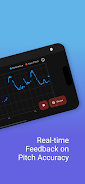
pitchy is a compact vocal and instrumental pitch training app that helps you identify, practice, and improve intonation. It combines real-time pitch detection with customizable exercises, clear visual feedback, and recording features to accelerate learning for singers, instrumentalists, and music educators.
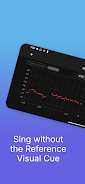
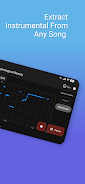
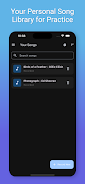
pitchy brings together essential tools for better tuning and ear training without overwhelming menus. Real-time pitch tracking displays your note and deviation, while a library of exercises focuses on scales, intervals, and melodies. Built-in recording and playback let you compare attempts, and export options simplify sharing practice sessions with teachers or collaborators.
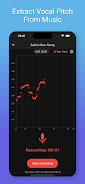
The app analyzes incoming audio through a low-latency pitch detection engine that prioritizes accuracy and responsiveness. A refined algorithm filters noise, identifies fundamental frequency, and maps it to the closest note name and cents offset. Visual indicators show whether you are sharp or flat, and adaptive sensitivity adjusts for different instruments and vocal timbres.
Practice in short focused bursts or longer sessions using modes tailored to particular goals. Exercises are designed to build muscle memory, aural recognition, and confidence when tuning by ear or with accompaniment.
The user interface balances clarity with functionality. A main pitch meter gives an immediate visual readout, while contextual panels reveal exercise controls and recording options. Drag-and-drop controls let you set reference pitches, loop sections, and adjust microphone sensitivity. Templates streamline repeatable practice routines so you spend more time singing and less time configuring.
pitchy adapts to your needs through a variety of settings. Choose concert pitch (A440 or alternative reference), switch between equal temperament and just intonation displays, and adjust visual themes for low-light practice. For accessibility, large meter modes and high-contrast color schemes make the app easier to use during rehearsals or live warm-ups.
Designed to run smoothly on a wide range of Android devices, pitchy prioritizes low CPU load and quick start-up so you can jump into practice sessions without delay. The app supports external microphones and USB audio interfaces where available, and conserves battery during longer use. Regular updates improve compatibility with new Android releases and incorporate user-requested improvements.
To get the most from each session, warm up with simple single-note tuning before moving into interval work. Use the session recorder to identify recurring pitch issues and set small, measurable targets for each week. When practicing with a backing track, set the sensitivity to reduce false readings while retaining musical detail.
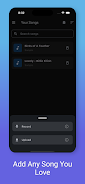
Installing and configuring pitchy takes only a few steps. Grant microphone access, select your instrument or voice type, and run a quick calibration to match the app to your environment. Create a practice template with favorite exercises and save it for daily use. Teachers can create shared templates to assign targeted tasks to students.
With clear visual feedback, flexible drills, and efficient workflow, pitchy is designed to help musicians build reliable intonation skills and maintain progress over time. Whether you need quick tunings before a rehearsal or a structured practice plan, the app provides the tools to sharpen your pitch awareness and musical confidence.
File size: 51.00 M Latest Version: 1.1.2
Requirements: Android Language: English
Votes: 311 Package ID: com.pitchy.app
Developer: pitchywitch

LIVE A HERO
Retro Hero Mr Kim
Empire of Passion
Arcane Quest Legends
Magic Snap: Momotaro
AllStar Manga Heroes
Lunescape
ONE PIECE Thousand Storm JP
Tap Titans 2





























