Scan to Download
Stewdy is a focused study planner app designed to help users organize learning sessions, track progress, and maintain consistent habits. It combines timers, task management, and analytics to keep study routines efficient. With built-in reminders and adaptable schedules, Stewdy supports both short sprints and extended study blocks for better retention.
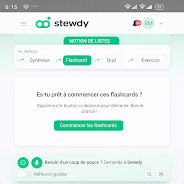
Stewdy bundles essential productivity tools into a single interface to reduce friction between planning and doing. The app provides session timers, a configurable to-do list for study items, and a progress dashboard that visualizes streaks and completed tasks. Notifications nudge you back into productive work while optional focus modes limit distractions.
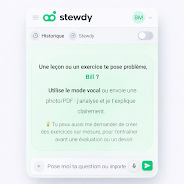
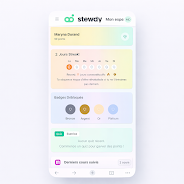
Stewdy keeps interaction lightweight and intentional. The main screen highlights the next planned session, active timer, and a short list of high-priority tasks. Swiping or tapping brings up detailed plans, past sessions, and analytics. The layout encourages quick decisions: start a session, log a topic, and switch focus without navigating through deep menus.
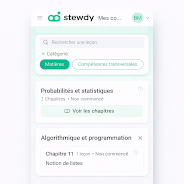
Use Stewdy to shape consistent study habits by converting vague intentions into scheduled sessions. Create morning or evening routines, block out study sprints between other commitments, or build a progressive schedule for exam preparation. The app helps allocate time proportionally across subjects so weaker topics get more attention and progress is easier to track.
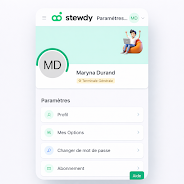
Adaptability is central to Stewdy. You can rename subjects, set custom colors for categories, and define goals for the week or month. Sync options allow backup to cloud storage so progress persists across devices. Notification preferences are granular, letting you control sound, vibration, and reminder frequency to match personal rhythms.
Designed for smooth performance on mid-range devices, Stewdy minimizes battery and data usage while running timers and background reminders. The app launches quickly and performs updates to analytics without delay. Compatibility spans modern Android versions, and offline functionality ensures you can log sessions even without network access.
Begin by listing your subjects and setting one-week goals. Configure a timer pattern that feels sustainable, then schedule a few sessions and enable reminders. After a week, review the built-in charts to see where adjustments will produce the most impact. Regular, small improvements compound quickly with steady tracking.
Stewdy aims for clarity and minimal friction, with tooltips and guided prompts to help new users. An in-app help area explains features and suggests study strategies without overwhelming the interface. Feedback channels allow users to suggest improvements and request integrations with other productivity tools.
With balanced design and practical features, Stewdy can function as a daily companion for learners looking to structure time, reduce procrastination, and measure progress in a meaningful way. Its combination of timers, planning, and analytics makes steady improvement feel achievable and visible.
File size: 49.69 M Latest Version: 1.0.12
Requirements: Android Language: English
Votes: 427 Package ID: com.stewdy.app
Developer: Neuranest Technologies

Top Free Board Games for Android
Gather around for game night anytime, anywhere with our new mobile board game. Play digital versions of classics like chess, checkers, backgammon and more against friends or AI opponents. With smooth online multiplayer, you can challenge players worldwide or create private games. Customizable boards, pieces, and house rules allow you to tailor the experience. Compete in daily tournaments or just play for fun.






LIVE A HERO
Retro Hero Mr Kim
Empire of Passion
Arcane Quest Legends
Magic Snap: Momotaro
AllStar Manga Heroes
Lunescape
ONE PIECE Thousand Storm JP
Tap Titans 2