Scan to Download
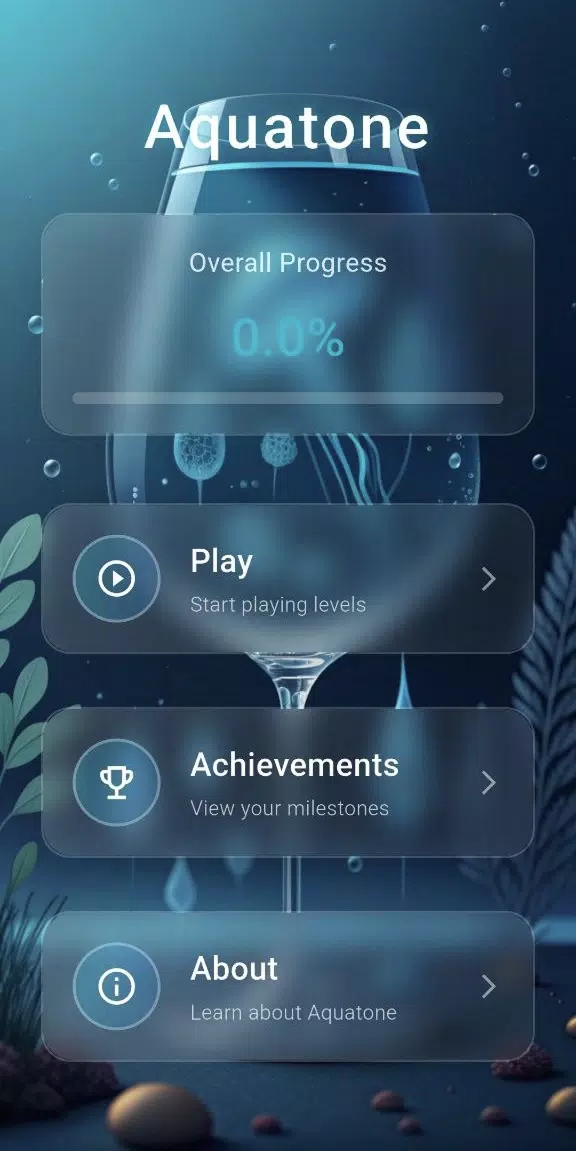
Aquatone is a lightweight color and background editor for Android that helps you create soothing aquatic-themed palettes, wallpapers, and gradients quickly. Designed for designers and casual users alike, Aquatone simplifies palette generation, live previews, and export options while keeping the interface clean and responsive for everyday use.
Aquatone focuses on turning color inspiration into usable assets. The app extracts palettes from photos, produces smooth multi-stop gradients, and offers one-tap wallpaper creation. Users can lock colors, nudge hue and saturation, and save combinations for later use. The result is an efficient tool for mockups, social posts, and phone personalization.
The Aquatone interface uses a minimal layout to keep tools close at hand. A central canvas previews edits in real time while collapsible tool panels hold fine controls. Tap to sample a color, drag to adjust gradient points, and pinch to zoom for detailed editing. The workflow emphasizes speed—select, refine, and export in just a few taps.
Aquatone includes precision controls for designers who need accurate color data. Use the eyedropper for pixel-perfect sampling, toggle color space between sRGB and Display P3, and switch numeric readouts between HEX, RGB, and HSL. Locking a color stop prevents accidental changes during complex adjustments, and an undo history helps revert edits quickly.
Built with performance in mind, Aquatone runs smoothly on mid-range devices and is optimized for Android 8.0 and above. Rendering is accelerated where available to keep gradient updates instantaneous. The app remains small in size to minimize storage impact and is designed to be battery-friendly by limiting background processes when not in use.
Exporting from Aquatone is straightforward. Save your wallpapers directly to the gallery, export gradients as scalable SVG for web use, or copy palette values to the clipboard. Projects can be shared via messaging apps or cloud storage, making it easy to move color assets between devices or hand them off to teammates.
Aquatone supports user customization through adjustable grid overlays, optional textures, and a dark UI theme for low-light editing. Integrations include quick-send to popular design apps and the ability to import palettes from standard ASE and GPL files. These options let Aquatone slot into existing creative workflows without friction.
To begin, open Aquatone and choose whether to import an image or start with a preset. Sample colors and arrange them into a palette, then switch to the gradient tab to design a background. When satisfied, pick the desired export format and save. Beginner-friendly tips are available in-app to guide first-time users through fundamental steps.
Aquatone is useful for mobile designers preparing visual assets, social media creators seeking consistent color themes, and anyone who wants personalized wallpapers. The app also helps hobbyists experiment with color harmonies and build reusable palettes for web or print projects.
With a concise set of tools focused on color creation and export, Aquatone offers a practical, responsive environment for turning color ideas into finished assets on Android devices.
File size: 16.40 M Latest Version: 1.2.0
Requirements: Android Language: English
Votes: 91 Package ID: com.glass.and.silicon
Developer: OLIVIIA HOLD

Top Free Casual Necessary Games for Android
Looking for some quick gaming fun? Our new super-casual game is perfect for entertaining bursts in your busy day. With simple, intuitive gameplay crossed with challenges that engage your brain, you'll keep coming back again and again. No complex controls or tutorials - just open and play anywhere, anytime. Vibrant art style and upbeat music create a lighthearted experience.






LIVE A HERO
Retro Hero Mr Kim
Empire of Passion
Arcane Quest Legends
Magic Snap: Momotaro
AllStar Manga Heroes
Lunescape
ONE PIECE Thousand Storm JP
Tap Titans 2