Scan to Download
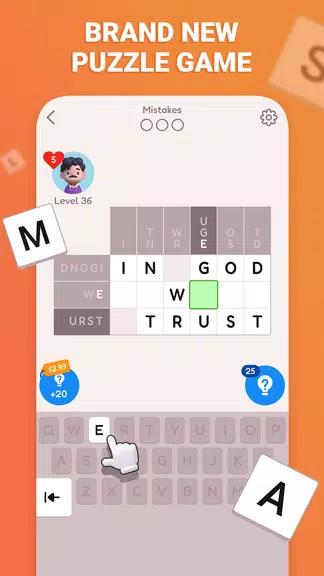
Wordogram is a brain‑boosting word puzzle that challenges your vocabulary and reasoning by asking you to reconstruct famous quotations from history using compact word grids; Wordogram presents puzzles with only a few letters at key intersections, and in Wordogram each completed grid reveals a memorable line of wisdom that rewards observation and lateral thinking. Designed for short, focused sessions, the game suits players who enjoy wordplay, literary fragments, and the satisfaction of completing a tightly packed grid to uncover a complete quote.
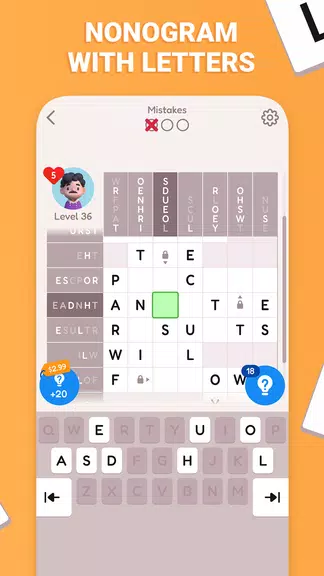
The core challenge of the app is simple to understand: a compact grid holds the words of a famous quotation but shows only a handful of letters where words intersect. Players must infer missing letters and whole words by recognizing patterns, word lengths, and contextual clues from the quotation itself. Puzzles vary in length and complexity so that early levels build confidence while later grids demand more associative thinking and broader vocabulary knowledge. Each solved puzzle displays the full quotation so the learning moment is immediate and rewarding.
Controls are intentionally straightforward to keep the focus on solving. Tap a cell to select it and use the on‑screen letter choices or an adaptive keyboard to fill words; an undo button lets you backtrack one or more steps if a guess proves incorrect. Visual feedback highlights correct letters and flags inconsistencies so you can quickly see where patterns break down. The interface keeps essential tools—hint, undo and puzzle navigation—within thumb reach so solving feels fluid on phones and tablets alike.
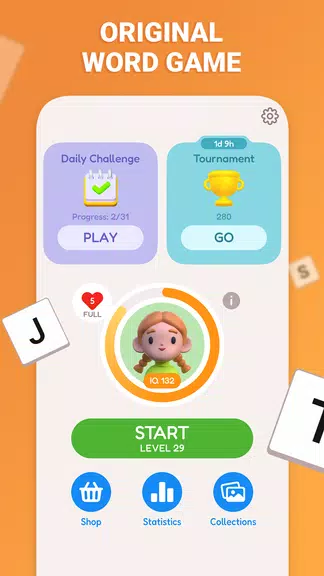
Puzzles are organized into a sequence that gradually increases in difficulty. Early grids rely on familiar phrasing and more revealed letters, while mid and advanced levels reduce letter hints and introduce less predictable wording. Progress is saved locally so you can pause and return to any unfinished puzzle, and completed levels are tracked to help you see improvement over time. The structure encourages steady learning rather than sudden difficulty spikes, making it easy to pick up where you left off.
To reduce frustration without removing the intellectual challenge, the app includes a contextual hint system that reveals a single letter or points out a word boundary when you need a nudge. Optional challenge modes tighten the hint budget or impose time limits to push players who prefer a tougher test. Because many quotations have recognizable phrasing and historical origin, players can revisit puzzles to improve completion speed or attempt harder challenge modes, which increases replay value even after a grid has been solved once.
The visual approach keeps grids clear and readable: high contrast tiles, legible typography, and subtle animation when letters snap into place. Theme options let you switch between light and dark backgrounds and adjust tile colors to suit your preference or ambient lighting. Font size and spacing can be adjusted to accommodate different screen sizes and reading comfort, and the simple aesthetic emphasizes content so the quotation remains the focus of each puzzle.
Accessibility is built into the design with scalable text, a colorblind‑friendly palette, and touch targets that meet comfortable sizing recommendations. The app supports screen readers for basic navigation and announces key events so players with visual impairments can participate. Controls are consistent across puzzles to minimize the learning curve, and a short guided tutorial introduces mechanics and available tools before you attempt your first full grid.
Wordogram works without an internet connection for the core puzzle experience, so you can play while commuting or in areas without reliable service. Progress and unlocked puzzles are stored locally on the device, and the app is optimized to run smoothly on a wide range of Android phones and tablets. Because puzzles are self‑contained, there is no need for persistent connectivity to enjoy daily practice and steady improvement.
Start with shorter puzzles to become familiar with the intersection clues, and use the hint sparingly to build pattern recognition skills. Expect some grids to require outside knowledge of phrasing or historical context; that is part of the educational appeal. If you prefer faster‑paced games, try the limited‑hint challenge modes for a quicker tempo. Overall, the experience balances thoughtful deduction with brief, rewarding gameplay sessions that sharpen vocabulary and logic over time.
File size: 38.70 M Latest Version: 1.1
Requirements: Android Language: English
Votes: 89 Package ID: com.word.gram
Developer: AdSide Media

Must Have Puzzle Games for Android
Are you searching for an enjoyable method to strengthen your intellect? Our hottest logical puzzle is tailor-made to offer a stress-free pastime experience. With beautiful graphics and chill background music, you can immerse yourself in an engaging world of logic and critical thinking. Solve increasingly tricky levels at your own pace, with no time pressure or lives system.





LIVE A HERO
Retro Hero Mr Kim
Empire of Passion
Arcane Quest Legends
Magic Snap: Momotaro
AllStar Manga Heroes
Lunescape
ONE PIECE Thousand Storm JP
Tap Titans 2