Scan to Download
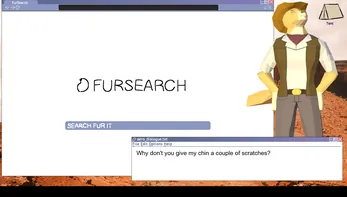
Desktop Cowboy Assistant is a short, NSFW visual novel-style desktop pet simulation that places Aero, a charismatic cowboy dog, at the center of a compact interactive experience. Designed for a single brief session rather than ongoing productivity use, Desktop Cowboy Assistant blends voiced character performance, 3D visuals, and light interactive choices into roughly fifteen minutes of story-driven play that skews toward adult audiences and personality-focused presentation.
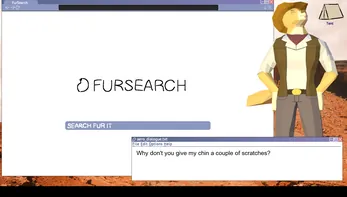
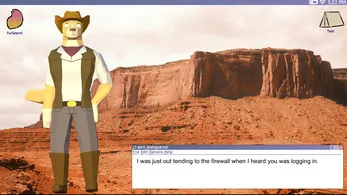
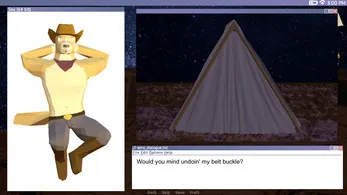
The core of the experience is a narrative vignette in which Aero acts as an in-fiction virtual companion: he banters, offers reminders about fictional tasks and appointments, and reacts to a small number of player choices. The structure is best described as a short visual novel with in-scene interactions rather than a full desktop assistant; visual sequences are rendered in detailed 3D and supported by hundreds of recorded lines, so the emphasis is on character performance and atmosphere more than on long-form gameplay or utility.
Gameplay uses simple point-and-click interaction and standard visual-novel mechanics: advance text with a mouse click or keyboard key, select from short dialogue choices when presented, and optionally enable auto-advance for a hands-off viewing. There are a few decision points that influence the tone of subsequent lines and some minor variations in Aero's responses, but the overall progression is compact and intended to be completed in a single sitting. The user interface keeps controls minimal and predictable, with on-screen prompts for choices, a settings menu to adjust audio and text speed, and clear options to skip or replay sections you want to hear again.
Progression in Desktop Cowboy Assistant is essentially scene-based: the story moves through a handful of set scenes or chapters, and certain choices can change dialogue branches and the order of a few lines. Replay value comes from the improvisational voice work and the volume of recorded dialogue—replaying the same sequence may yield different quips or tonal shifts rather than major plot divergence. Because the runtime is short, trying a second or third run to hear alternate lines is quick and straightforward, which encourages replaying for different conversational beats rather than extended long-term progression systems.
The presentation relies on polished 3D character models, lighting, and camera framing to create a glossy, character-focused look. Aero’s design and animation aim to convey personality through facial expressions and gestures, while the environment provides context for each scene. Sound design and voice performance are prominent: the project credits improvisational voice work that helps the character feel alive, and music cues are used sparingly to support mood without overwhelming the dialogue.
The app includes accessible options such as subtitles, adjustable text speed, and volume controls so players can tailor the experience. Visual quality and windowed/fullscreen modes can be adjusted in the settings to balance appearance with performance on a range of desktop systems. Desktop Cowboy Assistant is designed to run offline once installed, with no mandatory online connectivity required to experience the full story. These choices keep the experience straightforward and privacy-friendly for local play.
Because this is an adult-oriented simulation and not a utility, expect a brief, story-focused session rather than a persistent assistant or productivity tool. The developer has noted some programming bugs in early builds; there have been reports of inappropriate or unexpected behavior from Aero in rare cases. If you encounter problematic content or technical issues, close the application and submit a report to the developer with steps to reproduce the problem so it can be addressed in updates. Users should exercise discretion given the NSFW tone and treat the title as a narrative piece rather than a utility.
Installation is straightforward for a desktop-format APK: follow your device’s standard sideloading steps and grant any required local permissions. The runtime is intentionally brief to minimize resource demands, and the interface keeps options focused on playback, audio, and text controls. The overall user experience centers on a single-session sit-down where audio and visual presentation are the primary draws; expect a compact, polished moment with a strong performance focus rather than extended mechanics or customization systems.
The title highlights voice work by SlyLemur and music and sound design contributions from 365puppyboy; both are credited for shaping Aero’s personality and the game’s audio atmosphere. As a small, character-driven project, Desktop Cowboy Assistant reflects an indie approach to voice-forward interactive vignettes and aims to provide a concise, performance-led experience that can be revisited for alternate lines and tones rather than long-term gameplay.
File size: 154.98 M Latest Version: 1775277797
Requirements: Android Language: English
Votes: 198 Package ID: internet.cowboy
Developer: wannabeyourdog2

Top Free Board Games for Android
Gather around for game night anytime, anywhere with our new mobile board game. Play digital versions of classics like chess, checkers, backgammon and more against friends or AI opponents. With smooth online multiplayer, you can challenge players worldwide or create private games. Customizable boards, pieces, and house rules allow you to tailor the experience. Compete in daily tournaments or just play for fun.






LIVE A HERO
Retro Hero Mr Kim
Empire of Passion
Arcane Quest Legends
Magic Snap: Momotaro
AllStar Manga Heroes
Lunescape
ONE PIECE Thousand Storm JP
Tap Titans 2