Scan to Download
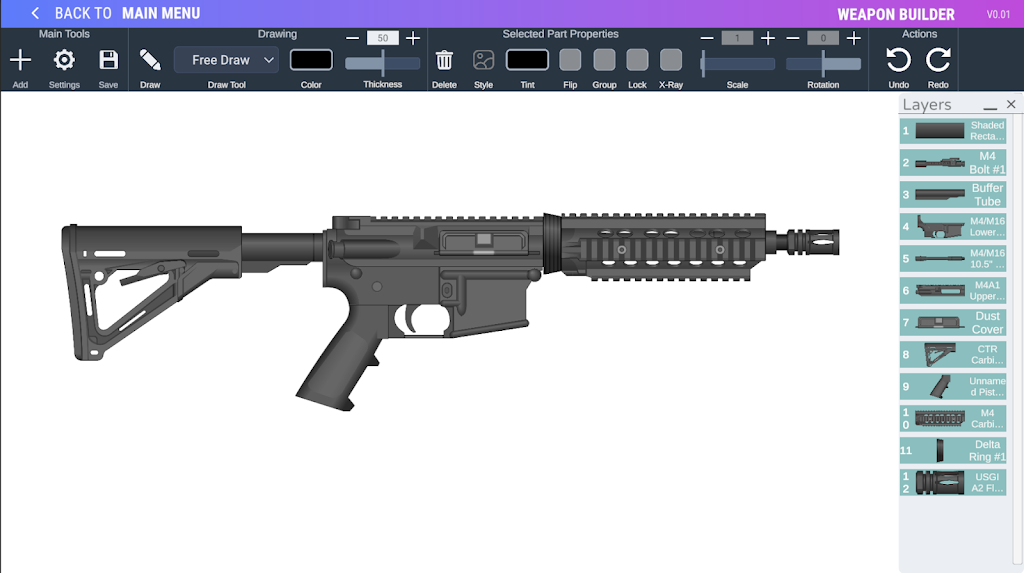
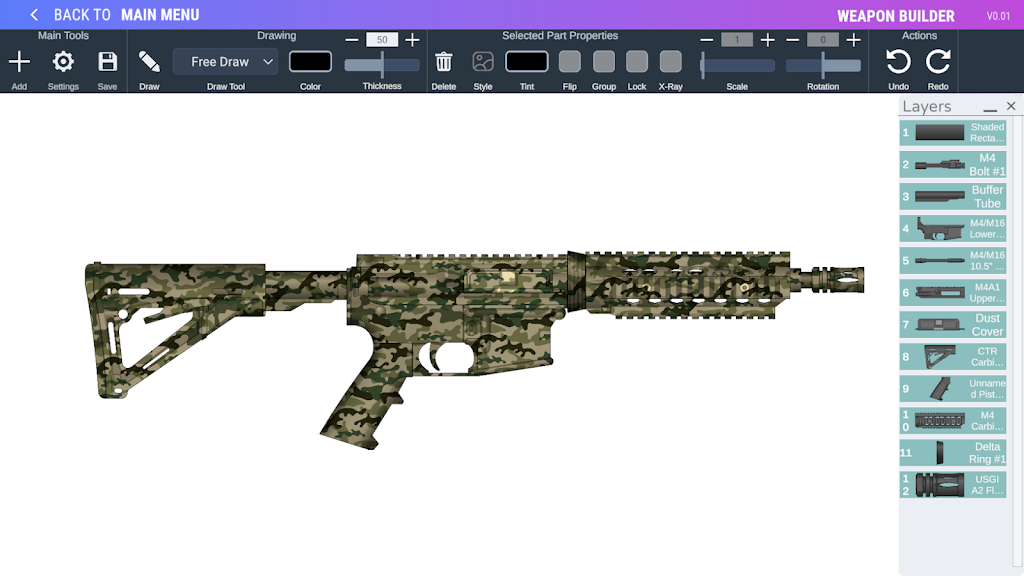
Weapon Builder 2 places a detailed weapons-design workshop in the hands of players who enjoy creative construction and visual customization. Weapon Builder 2 opens with an expansive parts library, flexible drawing tools, and an interface designed for iterative design: you can snap components together, draw custom shapes, apply tints and textures, and save projects to revisit later. The app focuses on styling and assembly rather than simulation or real-world functionality, making it a sandbox for visual experimentation and composition.
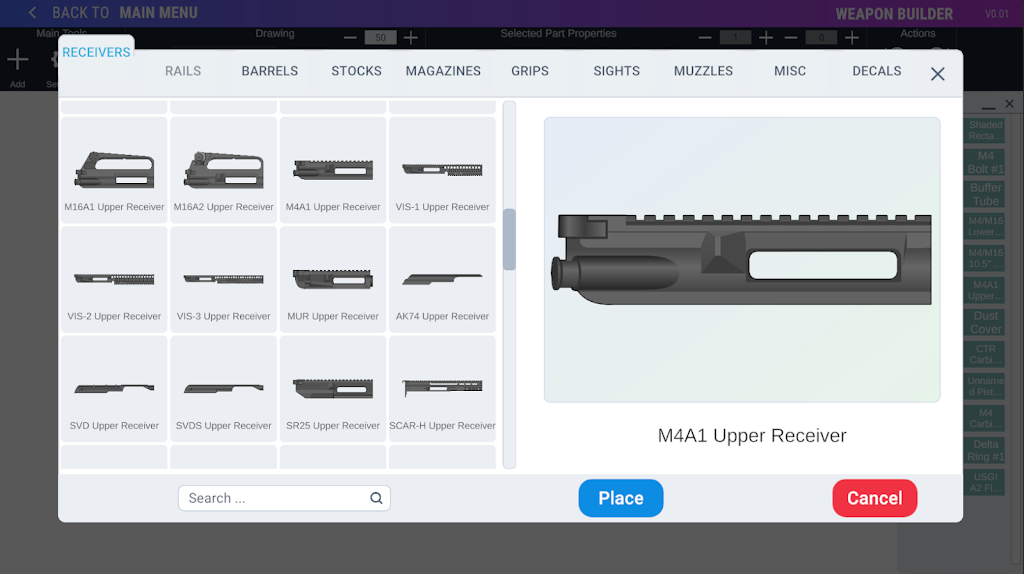
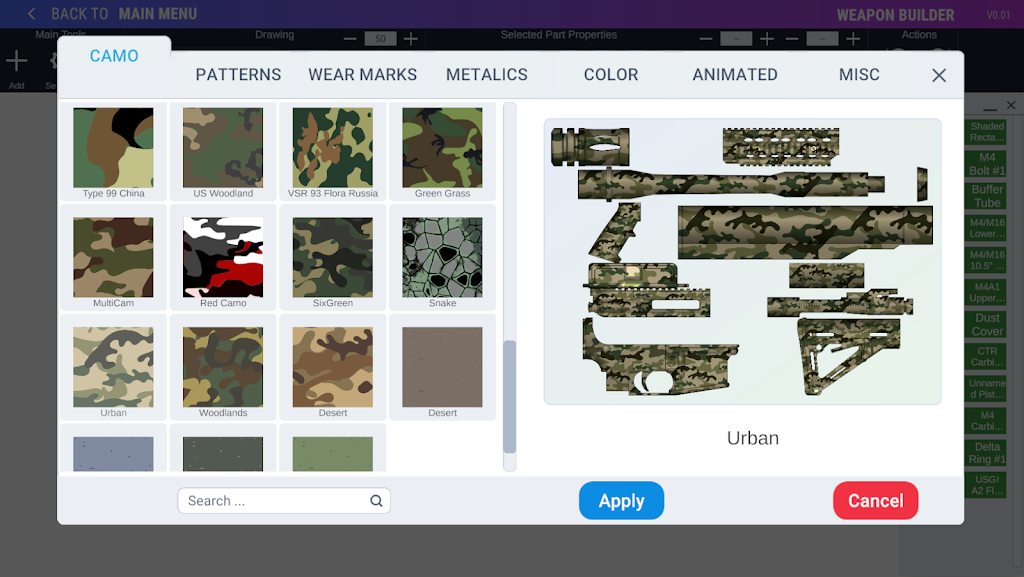
The toolset combines a catalog of over 800 preset parts with freehand drawing tools that let users add bespoke shapes and surface details directly onto components. More than 100 visual styles are available, including multiple camouflage patterns, graded wear marks, metallic finishes, and decal overlays. A toggleable snap system helps align compatible modules quickly, while precise transform controls allow scaling, rotation, and per-part color tinting. Save and load systems let you manage multiple builds and iterate on designs across sessions. The editor also includes undo/redo history to support detailed refinement.
Design sessions are driven by simple, direct controls that work well with both touch and mouse input. Drag-and-drop placement, pinch-to-scale, two-finger rotate, and context menus for layer ordering and alignment keep interaction tactile and predictable. Drawing tools include vector strokes and pixel brushes, each with adjustable opacity and pressure sensitivity where the device supports it. The interface emphasizes straightforward workflows so creative time is spent composing and styling rather than learning complex menus.
Rather than traditional combat progression, progression in Weapon Builder 2 centers on unlocking additional parts and visual styles through use and achievement. Complete optional design challenges and creative prompts to gain access to theme packs and rare components; these challenges encourage experimenting with proportion, color balance, and surface treatment without simulating mechanical function. Design tasks are organized into a flexible level structure that ranges from short daily prompts to longer themed projects, so players can pick quick exercises or commit to multi-session pieces.
The app emphasizes visual fidelity and stylistic variety. Presets cover a spectrum of aesthetic families from clean, modern silhouettes to heavily weathered retro looks. Custom textures and decals can be layered and blended using opacity controls, and parts can inherit material properties for consistent shading across a build. The results are suitable for screenshots, portfolio pieces, or to use as reference art for other creative projects. All components are illustrative and intended for creative expression rather than real-world replication.
Replay value comes from open-ended creativity and the progressive expansion of the parts library. The save/load system combined with version snapshots encourages iterative work: save multiple variants of a concept, compare them side by side, and refine the strongest ideas. The app supports export of high-resolution images so finished compositions can be shared externally. Regular content updates and community-curated challenge packs extend the creative loop without requiring online play or multiplayer components.
Weapon Builder 2 aims to be approachable for new users while offering depth for detail-oriented creators. Tooltips, a guided first-run tutorial, and contextual help reduce the learning curve. Adjustable UI scaling and color-contrast options improve accessibility across devices and lighting conditions. Control schemes adapt to both touch-first tablets and mouse-driven desktops, and common actions are mapped to intuitive gestures or clicks to keep the focus on design rather than control mechanics.
The app supports fully offline design work so you can create without an internet connection; saves are stored locally and can be exported for backup. Performance optimizations aim to keep large builds responsive on a wide range of Android devices, and graphical quality settings allow you to balance visual fidelity and performance for older hardware.
Weapon Builder 2 is intentionally a styling and assembly sandbox and does not simulate ballistics, mechanics, or operational behavior. All parts are illustrative and any resemblance to real-world designs is coincidental. The app is best suited to users interested in art, concept work, and visual experimentation rather than functional testing of constructed items.
Weapon Builder 2 builds on contributions from legacy community projects and acknowledges several contributors in the in-app Credits section. The development team continues to iterate on tooling, add creative assets, and improve accessibility based on user feedback. For full credits and artwork attributions, see the app's Credits page within the settings menu.
File size: 139.55 M Latest Version: 0.28
Requirements: Android Language: English
Votes: 461 Package ID: com.sbCreations.com.WeaponBuilderMobile
Developer: Code Professor

Best Action Necessary Games for Android
Experience nonstop thrills with our newest edge-of-your-seat action game! With console-quality graphics and intuitive touchscreen controls, you'll be drawn into high-octane combat and stunt-driven gameplay. Choose from an arsenal of upgradable weapons and vehicles to blaze through enemy bases, post-apocalyptic cities, and more. Physics-based action packed with explosions and destructible environments make every level more intense than the last.






LIVE A HERO
Retro Hero Mr Kim
Empire of Passion
Arcane Quest Legends
Magic Snap: Momotaro
AllStar Manga Heroes
Lunescape
ONE PIECE Thousand Storm JP
Tap Titans 2